A tier 1 SOC interview is a different animal from a help desk one. On the help desk they want to know you can calm someone down and reset a password without breaking anything. In the SOC they want to know whether you can look at an alert for ninety seconds and decide what it is, and a wrong call in either direction costs money. I have sat on both sides of both tables. The SOC panel asks fewer questions and listens much harder.
The question list barely changes between companies, though, and none of it needs a job history to answer.
”Walk me through a phishing email”
The opener almost everywhere. It checks whether you have a fixed order of operations or poke at things at random. Start with the headers, because the display name is the one thing an attacker fully controls: compare the return path to the From address, read the SPF, DKIM and DMARC results, look at the sending IP and the age of the domain. Then check where the link really goes on hover and whether the attachment makes sense for the sender. Then scope. One recipient is a nuisance and two hundred is an incident, and most candidates forget to ask who else got it and who clicked. Finish with containment: purge it from every mailbox, block the sender and the URL. The help desk half is in how a help desk handles a phishing report.
”What is the difference between a false positive and a benign true positive?”
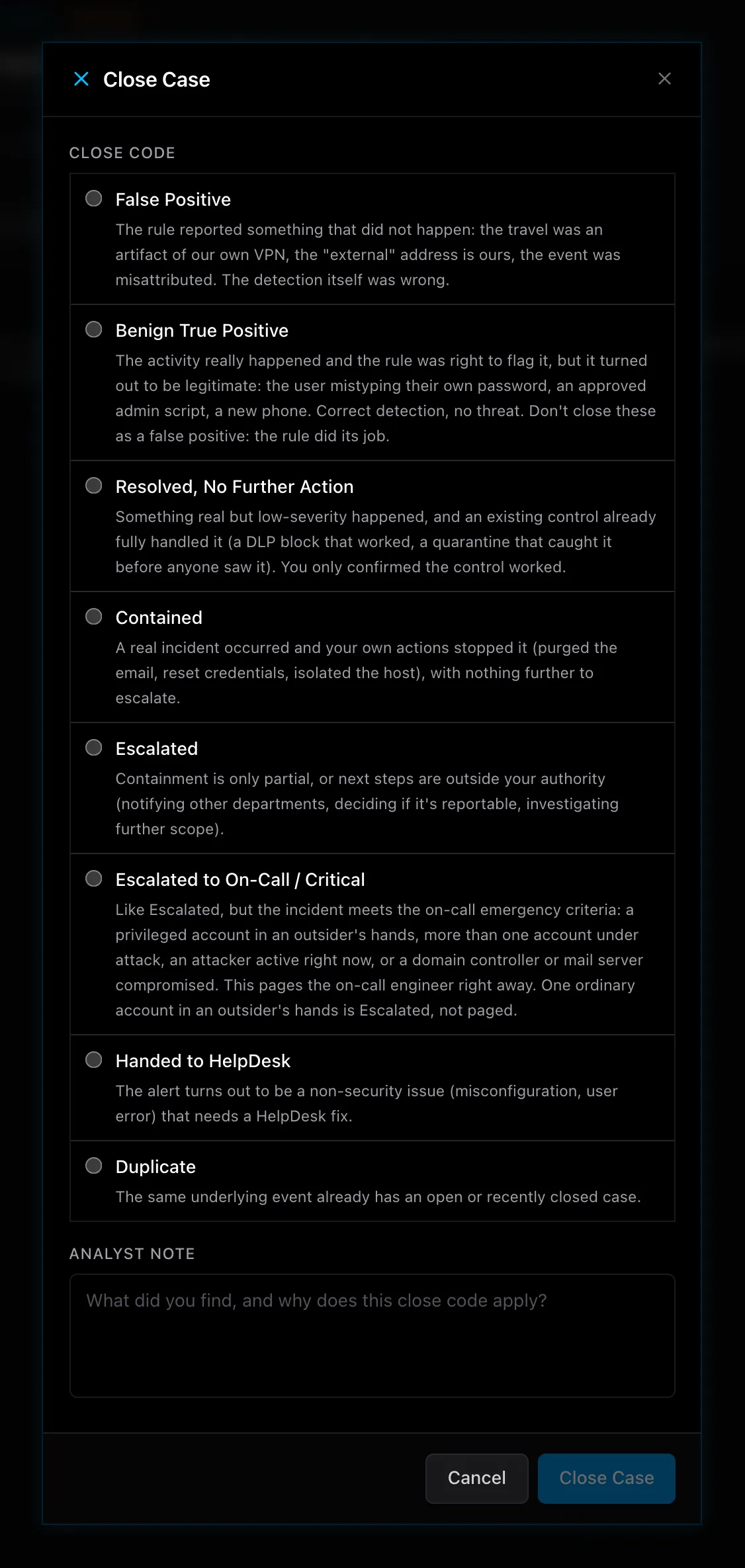
This one separates people who have closed cases from people who have read about them. A false positive is a detection that fired on something that never matched what the rule was written to catch. A benign true positive is a detection that caught exactly what it describes, and the activity turned out to be authorized. A vulnerability scanner running from the IT team’s jump box looks like port scanning because it is port scanning. The fix is different in each case: a false positive means the rule needs correcting, and a benign true positive means the scanner’s host needs an exception, with the change ticket and the owner’s name in the note. An analyst who closes every annoying alert as a false positive quietly rots the detection library.
”How would you investigate an impossible travel alert?”
They want to hear you resist locking the account in the first ten seconds. Pull the user’s sign-in history and put both events side by side: location, device, client app, whether MFA was satisfied, the minutes between them. A sign-in from the office at nine and from another continent at nine fifteen has three ordinary explanations: a VPN exit node, a phone on a mobile carrier whose IP block geolocates somewhere odd, or a mail client syncing from a cloud service. Rule those out with the device and app fields. If the second sign-in is on an unknown device, passed MFA through a method the user does not recognize, and is followed by a new inbox rule or an app consent, you are in a compromise. Revoke sessions, reset the password, then audit the mailbox for rules that forward or delete mail. Why a passed MFA prompt proves less than it seems is in what MFA actually stops.
The fundamentals: the handshake, DNS and ATT&CK
Someone will ask for the TCP three-way handshake or DNS, checking that you can describe a protocol in plain words. The client sends a SYN, the server answers SYN-ACK, the client sends ACK, and both sides now agree on sequence numbers. For DNS: the resolver checks its cache, then asks a root server, the TLD server and the authoritative server in turn, and you care because a machine making hundreds of lookups for long random subdomains is probably tunneling data out.
MITRE ATT&CK comes up as “name the tactics you know.” Name the ones you have seen in an alert and say what the alert looked like. Initial Access is the phishing email. Persistence is the inbox rule or the scheduled task that survives a reboot. Credential Access is the password spray against the sign-in portal. Exfiltration is the DNS tunnel from the paragraph above. Four tactics, each tied to an alert you can describe, do more for you than fourteen recited off the poster.
”When do you escalate, and what goes in the case note?”
Usually asked together, to check whether you know the limits of a tier 1 seat. You escalate when containment would take an action you are not authorized to take, when the scope crosses more than one host or one account, when the evidence points at an insider, or when you have spent your time budget and still cannot explain what you are looking at. Where the tiers draw their lines is in tier 1, tier 2 and the threat hunter.
The case note is the part the interviewer remembers. A good note states what the alert was, what you checked, what you found, what you did and what you concluded, in that order, with timestamps and the exact artifacts: the IP, the hash, the username and the host it ran on. Whoever opens the case six months from now should be able to rebuild your reasoning without you. Say that out loud and watch the panel nod.
Answering all of this with no experience
Every investigation you have run so far happened in a lab, so describe each one in the detail you would use for a real incident: the alert, the logs you pulled, what the sign-in history showed, which close code you picked and why. A method practiced on fake alerts is still a method. LetsDefend and TryHackMe have alert queues to work, and a home lab with a SIEM you stood up yourself earns more conversation than any line on the cert list. ServiceDesk Simulator now has a security desk in beta where you work an alert queue with a log search, sign-in history, an endpoint console and a threat intel lookup, and close each case with one of the eight codes above and a note. Each alert carries its ATT&CK tactic, so the tactics question answers itself after a week. The beta opens with a passcode, and the waitlist is on the Security Simulator page.