Half the people you support are not in the building. Getting a machine to them, and the old one back, is a ticket that lasts a week.
Half the people you support are somewhere else, and a ticket you cannot walk over to becomes a logistics job.
Part one
On the job
Remote onboarding, couriers, custody, packaging, customs, and the return leg everybody forgets.
The user is somewhere else
A desk that supports one office solves hardware by walking. Support a company where people work from home and the same fault becomes a different job entirely.
The same dead laptop, two jobs
In the building
1Take a spare off the shelf and swap it at their desk.
2Carry the dead one back yourself.
3The ticket is twenty minutes old when it closes.
Working from home
1Everything you know about the machine reaches you through the user describing it.
2The fix travels by courier, on a third party’s timetable.
3The ticket is open for a week, with a middle where nothing happens and the user still expects an answer.
The fault is identical in both columns. What changes is who has custody of the machine and how long the ticket runs.
People underestimate how much of a service desk job this is. Interviewers ask about it constantly, because the answer shows whether you have worked to a process.
A shipping ticket is mostly record keeping. What goes wrong is the wrong address, the return that never came back, and the note nobody wrote for the colleague who picked the ticket up on Thursday.
Remote onboarding and the start date
The commonest scheduled version of this job is a new starter: somebody accepted an offer, they begin on the ninth, and they live two hundred miles from anyone in IT. A configured machine has to be in their hands before their first morning, with whatever else the role needs: a dock, a monitor, a headset, a hardware key.
Read this one right to left
Request approved
Built
Packed
Collected
In their hands
Work backwards from the start date. A laptop that arrives on the start date has arrived late: the new starter spends their first morning waiting for a courier and then sitting through a first-run setup on a video call with a stranger.
When it does arrive late, and it will, the cause sits upstream of the courier. The request reached IT four days before the start date, or the hiring manager assumed a machine had already been ordered, or the build was waiting on an account HR had yet to create. Say so plainly in the ticket, and have a fallback ready: a loan machine sent express, or a first day of induction that needs no laptop.
A good desk publishes the lead time and then defends it. "Fourteen days from an approved request" is a promise you can keep. "As soon as possible" is a promise that turns every starter into an emergency.
Courier vocabulary
You need the words, because you will be reading a courier portal and quoting it back to a user who is annoyed.
Waybill
The shipping document that travels with the parcel: sender, recipient, contents, service level, reference. The label on the box is the printed form of it. On an air freight leg it is the air waybill, and its number is what the freight desk quotes.
Tracking number
What a parcel courier actually hands you, and the identifier that lets anyone follow the box through the network. Quote it on the phone and put it in the ticket, and anybody can answer "where is it" without asking you.
Service level
What you bought: ground, two-day, next-day before noon, same-day courier. The biggest lever you have on when something arrives, and on what it costs.
Signature on delivery
The recipient signs, and the courier records who signed. Buy it on every laptop: the signature is your evidence that the machine reached the person it was addressed to.
Proof of delivery
The record of that signature, retrievable from the courier later. The document you produce when a machine is disputed six months afterwards.
Chain of custody
The chain Asset Management drew from the dock to disposal, with a courier added to the middle of it. A gap in it is a stretch of time where nobody can say who was holding the device.
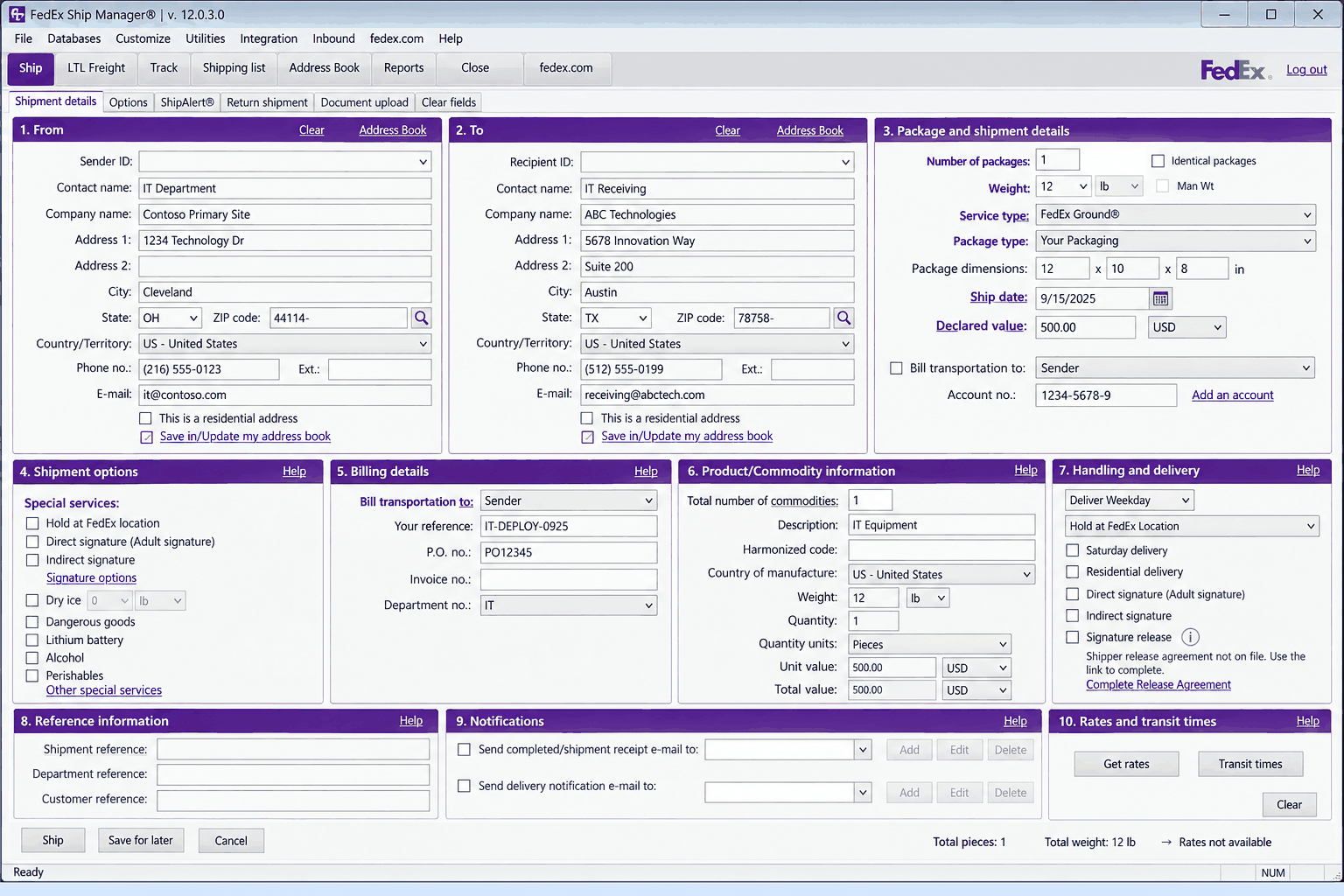
An illustration of the booking screen a courier gives a business account, and most of the words above turn up on it as fields you have to fill.
FedEx, FedEx Ship Manager and FedEx Ground are trademarks of Federal Express Corporation. ServiceDesk Simulator is not affiliated with, endorsed by, or sponsored by them.
The one line on the booking that people cut
Signature on delivery
1The courier records who signed for it.
2The courier’s own record of who took delivery.
3Proof of delivery is still retrievable when the machine is disputed six months later.
Left in a safe place
1Cheaper, and the box is behind a bin.
2No record of who picked it up, or whether anybody did.
3A loss, an incident, and a very awkward conversation with whoever owns the asset register.
Chain of custody runs IT, courier, user, courier, IT. Signature on delivery is what closes the middle link, and it is the one people skip to save money.
Packing it
A laptop needs real packaging to come through a parcel network intact. The rule of thumb: nothing inside the box moves, and nothing touches the wall of the box. Manufacturer packaging is engineered for exactly that, which is the real reason a good stockroom keeps the boxes.
Practical version: lid closed with nothing resting on the keyboard, the charger bagged separately so the brick is not hammering the chassis for two days, a couple of inches of padding on every face, and the box taped so a dropped corner is absorbed rather than transmitted. Take the dongle out of the USB port before it becomes a lever.
The return leg
Returns get forgotten, and they are what an auditor asks to see. Every machine you send out to replace something means a machine somewhere that has to come back. A leaver is the same problem with a deadline: their last day is fixed, their laptop has company data on it, and after that day they have no reason to think about you at all.
The box the new machine came in is the box the old machine goes back in, and the prepaid return label goes in that box. The packaging, the postage and the address are already in their hands. Every step you remove from the returning user is a percentage point of returns you actually get back.
A prepaid return label already carries the shipper’s address, so the destination is yours to choose: an IT department that processes returns, or a central warehouse that holds stock. Put the ticket reference on the return too, so the parcel that arrives can be matched to the machine it is supposed to be.
Chasing, and writing it off
Chasing is a scheduled job with somebody’s name against it. A working process has dates on it, and a defined point where the asset is marked as not recovered.
A return that is actually chased
Label in the box
Reminder, day 7
Manager, day 14
Legal or HR
Not recovered
Involving the manager sounds heavy and is the step that works: for the leaver this is now somebody else’s problem, and the manager still has a relationship with them.
If the person stays unresponsive after their manager has asked, it stops being an IT problem. A company laptop is company property, and the escalation goes to HR while somebody is still employed and to the legal team once they have left, usually as a letter quoting what the machine is worth and giving a final date. It almost never goes that far, and the reason it can is the paper trail underneath it.
The write-off is signed above the technician chasing it, and the technician builds the file it gets signed on: what was sent, when, to what address, which label, who signed, what was chased and when. It is an accounting and security event, and a machine holding company data that is never coming back may need reporting as a data risk as well as a lost asset.
Addresses, sites and borders
The most common way a shipping ticket fails: you shipped to an address that used to be right.
Addresses rot. People move house and tell HR, or tell nobody at all. The address on a three-year-old asset record is a guess. So confirm the delivery address with the human, in the ticket, every time, and write what they said into the ticket so the next person can see where it came from. That confirmation takes one message and prevents the failure that costs a week.
Where a parcel is actually going
A personTheir delivery address, confirmed by them today, in the ticket.
Shared kitA shop-floor kiosk, a warehouse cart laptop, a lab machine. It belongs to a site, so it goes to that site’s receiving dock, where somebody whose job is receiving goods signs for it. Send it to whoever filed the ticket and a warehouse machine ends up in their spare room.
Across a borderA commercial invoice: contents, value, materials, origin, tariff code, and in a small company you are the one filling it in. Declared value is what the equipment is worth, and undervaluing it to dodge duty is fraud that also caps what you can claim back. Incoterms decide who pays the import charges, which is the difference between a laptop arriving and a new starter being asked for two hundred dollars at their own front door. Some destinations need an importer of record, so company equipment lands at a registered business address, and customs adds days no service level can promise away.
Many companies answer the border problem by keeping regional stock, or by renting from a provider in that country. If yours does, use it: shipping a laptop across a border to save a hundred dollars is a false economy roughly every time.
A ticket that lasts a week
Almost every other ticket you work is finished in one sitting. This one runs for a week, and that changes what a good ticket looks like.
Assume somebody else closes it. You could be off sick on the day it arrives, and the colleague who picks it up should be able to read the whole week off the ticket. Write it for them: what was confirmed and by whom, what was sent, which unit by name or asset tag, which address, which service level, which tracking number, whether a return label went in, and what the next expected event is with a date on it.
Keep the user informed on a rhythm. A message when it ships with the tracking number, a message when it lands, a message when the return is still outstanding. Silence during a slow ticket is what turns a patient user into a complaint.
When the ticket is actually finished
Shipped
Delivered
User confirms
Old one back
Closed
Closing on the tracking event is the single most common way a shipping ticket gets reopened.
Close the ticket when the user confirms the new machine works and the old one is back or accounted for. The courier’s delivered scan usually lands days earlier than that.
Part two
How this works here
The shipping console, what each box on it stands for, and the rules it will refuse you on.
The shipping console
Open Tools, then under Management choose Ship Manager. The header says Send hardware to an end user: the console addresses a package and sends it, and every rule it enforces comes from part one.
Three panels, in the order the form asks
RecipientWho signs for it and where it physically goes. The consignee block.
PackageSender, reference, contents and service level: what the courier bills, and what your desk searches on later.
Return labelAppears only once you tick it. The prepaid waybill that goes in the box for the old machine.
Every panel maps to a block on a real waybill, in the order a courier booking asks for them.
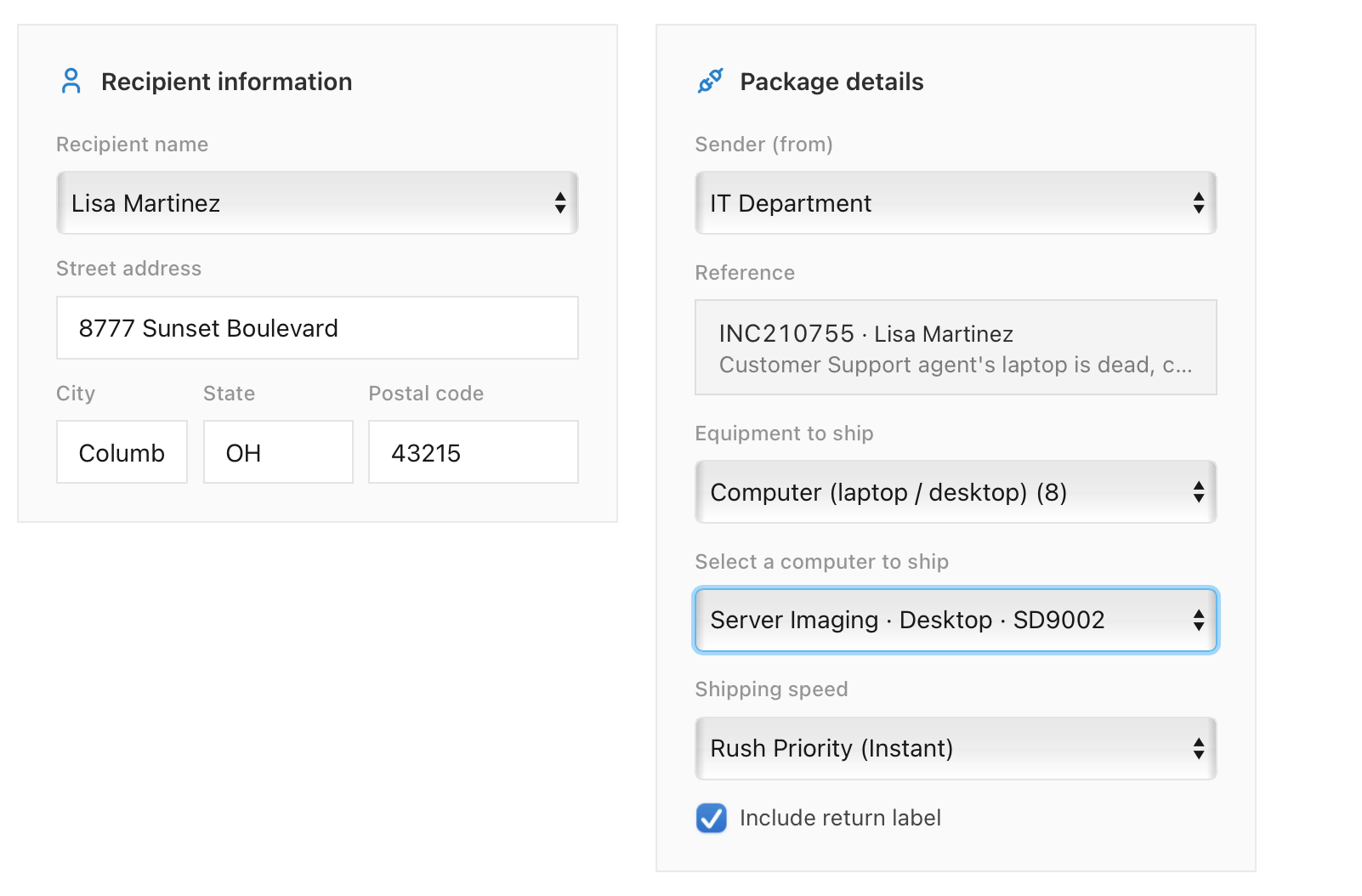
Recipient information holds Recipient name, chosen from the staff list, and the four address boxes: Street address, City, State and Postal code. The address comes from the person, the way it does at work: you ask them over Company Chat or on a call, and that is the exercise. A Refill last address shortcut appears once you have shipped something, and it is remembered only until you reload: useful for a second leg on the same ticket, and wrong on a different person.
Package details holds the rest. Sender (from) is the department the parcel is from, and is cosmetic. Reference carries the weight: it shows the request this shipment is booked against, by number and requester, so read it before you press anything. Equipment to ship is the contents, from cables and chargers up to Computer (laptop / desktop), which shows the number of built units in brackets beside it.
Choose the computer option and a Select a computer to ship picker appears, listing every unit on the shelf by build method, device type and hostname. With an empty shelf you get an Open Computer Deployment button instead, because the machine has to be built in Computer Deployment before it can be sent. Shipping speed offers four: Standard (5 to 7 days), Express (2 days), Priority (Same day) and Rush Priority (Instant). It is genuinely how long the package takes to arrive in here, about twenty seconds down to none.
Every box on this form is a custody record. The reference is the one that matters most, because it is what ties a named unit to a named person: a shipment booked without one becomes a machine the company can still see on a register and can no longer find.
Tick Include return label and a third panel appears. Returning to picks the depot, IT Department or Central Warehouse, and Prepaid label ships to fills in that depot’s address by itself, for the same reason a real prepaid label already carries one. Then Ship.
The three checks, and the mistake that ships
Three checks run before a package leaves, and they are the three failures from part one. All three hang off the request named in Reference. Address a package to somebody whose name resolves to no open request and there is nothing to check it against: it goes out with the same confirmation and credits nothing.
The recipient. The package has to reach the person on the ticket. Address it to somebody else, at however valid an address, and the console refuses it.
The address. A correct address ships. A wrong one is refused with Shipped to the wrong address, so the user never received it. In between: the console queries a postal directory with what you typed, and if the street number and postal code resolve to a real record with only a descriptive detail off, such as a misspelled city, it offers what it found under Address lookup found a matching record: with a Use this address button. It offers the record and then waits: the shipment moves once you have picked one.
The return label. A whole computer ships only with Include return label ticked. The broken machine has to come back, so the label has to be in the box before the box goes.
What it stops, and what it lets through
Refused
1A recipient who is not the person on the ticket.
2An address that does not resolve to a real record.
3A whole computer sent with no return label.
Allowed through
1The right person, the right address, and entirely the wrong build.
2The package goes and the console says nothing.
3The user messages seconds later to say they cannot work on it.
A wrong build gets caught when the box is opened in somebody’s house, here and at work alike, and putting it right costs a second shipment.
In the console
What it stands for
Recipient information
The consignee block on the waybill: who signs for it, and where it physically goes.
Sender (from)
The shipper block. Cosmetic here, and on a real label it is where a refused parcel returns to.
Reference
The your reference field every courier account has. An IT desk puts the incident number in it.
Equipment to ship
The contents declaration, which on an international leg becomes the commercial invoice.
Computer picker
The specific unit off the stockroom shelf, by asset name, so the record matches the object.
Shipping speed
The service level you buy, and the only real lever on the arrival date.
Include return label
The prepaid return waybill you put in the box for the old machine.
Returning to
Which depot processes returns: the IT team, or a central warehouse.
Ship
Handing the parcel to the courier, which is the moment a tracking number exists.
Delivery countdown
Tracking events, compressed into seconds.
After you press Ship
A Shipment sent confirmation pops, a countdown runs in the panel, and Delivered! appears when it lands. The arrival is what matters: the requester messages you when the box turns up, and a correct replacement resolves the ticket at that moment.
At work the close comes when the user confirms the new machine works and the old one is back or accounted for, which is days after the delivery scan. Here the arrival does both jobs at once: the requester's message stands in for that confirmation, the ticket resolves on it, and the return leg is outside what the queue tracks. So this queue closes a shipping ticket one step earlier than a real desk does. The chasing from part one, a reminder at seven days and the manager at fourteen, belongs after the point where this ticket has already resolved, and on a real desk it is yours to do.
That timer survives a reload. A package in transit when you close the tab is re-armed when the session comes back, because the ticket needs that arrival before it can close.
What a real send hangs off
Here the countdown is the whole journey. At work the send produces a waybill and a tracking number first, and that number is what everything afterwards hangs off: into the ticket the moment it exists, quoted to the user who asks where their laptop is, quoted to the courier when the parcel is lost, damaged, or refused at a reception desk that did not recognize the name. Shipping speed here changes a wait; at work it changes a price, and across a border the commercial invoice is what decides the date. Write the same things into the ticket here that part one asked for: who confirmed the address, which unit went, which label, and what the next expected event is.
Part three
Practice
Send a replacement to the person on the ticket, and close the loop properly.