
ServiceDesk Simulator

The Support Toolkit · Module 14 of 16

PC Shelf

The physical half of the desk. What is on the shelf, what is spoken for, and why a spare that nobody logged is not a spare.

Every desk runs on a room full of hardware, and it stays a stockroom only while somebody records what goes in and what comes out.

Part one

On the job

The physical half of the service desk: spares, loaners, goods-in, and the stock levels that decide whether a dead machine is a five minute job.

The stockroom and its five piles

A large part of service desk work happens in a room with shelving in it. What is on those shelves, and who took what off them, is tracked by the technicians working the desk.

A typical IT stockroom holds five piles at once, each with its own rules. Mixing them up is how a machine meant for disposal ends up on somebody's desk.

Five piles, five sets of rules

Spares Machines ready to hand out now, in the models you actually run.
Loan pool Short-term use. Goes out, and is supposed to come back.
Consumables Chargers, cables, adapters. Issued and rarely tracked back. Docks, headsets and other peripherals get their own asset records and stay on the books.
Goods-in Deliveries that have landed and still have to be checked, tagged and booked in.
Retired kit Locked away for disposal or collection, on its own paperwork until it leaves the building.
Check which pile a machine is in before you touch it. Each pile has its own rule for who may take a unit and what has to happen before it moves.

How many of each, and why

Set the level from three numbers: how many of that model you run, how often they fail, and the lead time from the supplier. A thousand laptops at a two percent annual failure rate with a four week lead time means a handful of spares on the shelf at all times. Escalate when the shelf drops below that handful, while there is still stock to hand out.

This is also the argument for a standard build list. Two laptop models across the company means two spares pools and two images. Nine models means nine of everything, and a stockroom somehow always out of the one you need.
The loan pool

A loaner covers the gap: a machine in for repair, a contractor here for six weeks, a user whose replacement is stuck in transit. More machines go missing out of this pile than out of any other in the room.

The same machine, written down or not

A loaner with a record

  • Same asset tag as any other machine.
  • A named holder, and a check-out.
  • Sits on the overdue list until it comes back.

A loaner nobody wrote down

  • A two week loan quietly becomes eighteen months.
  • The register still counts it as in stock.
  • Nobody can say who has it, or since when.
Give a loaner the same record as a permanent machine. The only extra field is a due date.

Put a due date on every loan, then read the overdue list once a week and chase what is on it. That job usually lands on you.

The number you can actually promise

Two technicians look at the same shelf, both see four laptops, and both promise one to their user for tomorrow morning. One laptop was actually free: two are earmarked for next week's starters and one is a loaner coming back that still has to be wiped. Both made a promise against that one unit, and one of them breaks it in front of a user.

Two states a unit can be in

On the shelfHas a name on itSafe to promise
Available YesNoYes
Reserved YesYesNo
The moment stock is promised it is reserved, and available is the number the next technician can promise against.

Record a promise the moment you make it, the same way you record a check-out. Custody starts at the promise.

Min, max, and the reorder point

Stock control has five words worth knowing. They turn "we should probably order more laptops" into a number anyone can check.

Minimum
The floor the shelf is kept above. In most min/max systems it is also the reorder point: reach it and you order.
Maximum
The ceiling an order tops you back up to. Capital on a shelf is money not spent elsewhere, and hardware depreciates while it waits.
Reorder point
The level that triggers a purchase: what you expect to use during the lead time, plus safety stock.
Safety stock
The buffer inside that number, for the week when three machines die at once or the supplier slips a delivery.
Lead time
From raising the order to the boxes arriving. Ask the supplier for it rather than guessing, because the reorder point is built on top of it.

What the reorder point is for

Stock falls
Reorder point
Order raised
Lead time
Delivery lands
The reorder point is lead-time demand plus safety stock, so the delivery lands before the shelf empties. Order later than that and you are short for the whole lead time.

Skip this and a starter arrives on Monday to an empty desk, because the order that should have gone in three weeks ago went in on Friday.

Goods-in, and the build-ahead pile

A pallet arrives. Three things have to happen before any of it counts as stock.

Three things that have to happen first

Before the courier leaves Delivery note against the purchase order, box count and models. Count the boxes before you sign, because after that the shortfall is yours.
Before it is shelved Every serial recorded, an asset label on each machine, and a register row marking the unit in stock.
Before Monday The build-ahead pile. Somebody spends a slow Thursday imaging four laptops, so three starters on Monday each get a machine handed straight to them.
Tag every machine before it goes on the shelf. The label is how the next person knows whether a unit is new stock, a loaner waiting to be wiped, or a machine already promised to a starter.

Book each build-ahead unit in as you finish it. Building a machine and booking it in are two separate jobs, and a machine that has been imaged while it still sits outside the register is exactly the unit two people will promise to two different users.

Log a spare the moment it is built, before it reaches the shelf. An unlogged machine sits outside the count, so nobody can promise it, and you find out it was never there on the morning you needed it.

Part two

How this works here

The PC Shelf: what sits on it, and what makes a unit real stock.

The PC Shelf

Tools, then PC Shelf. It is the stockroom shelf: every computer you have built in Computer Deployment and not yet sent out sits here, drawn as a unit. Machines come back to it too: unassign one in Asset Management, or set a computer back to ready, and it reappears here carrying the build it already had, which is a simplification. A real stockroom wipes and reimages every machine that comes back before it is shelved again, whoever returned it: the drive still holds the last person's files and cached credentials, and the rebuild is what makes the unit safe to hand to the next person. The shelf is saved as you go, so it comes back exactly as you left it after a reload.

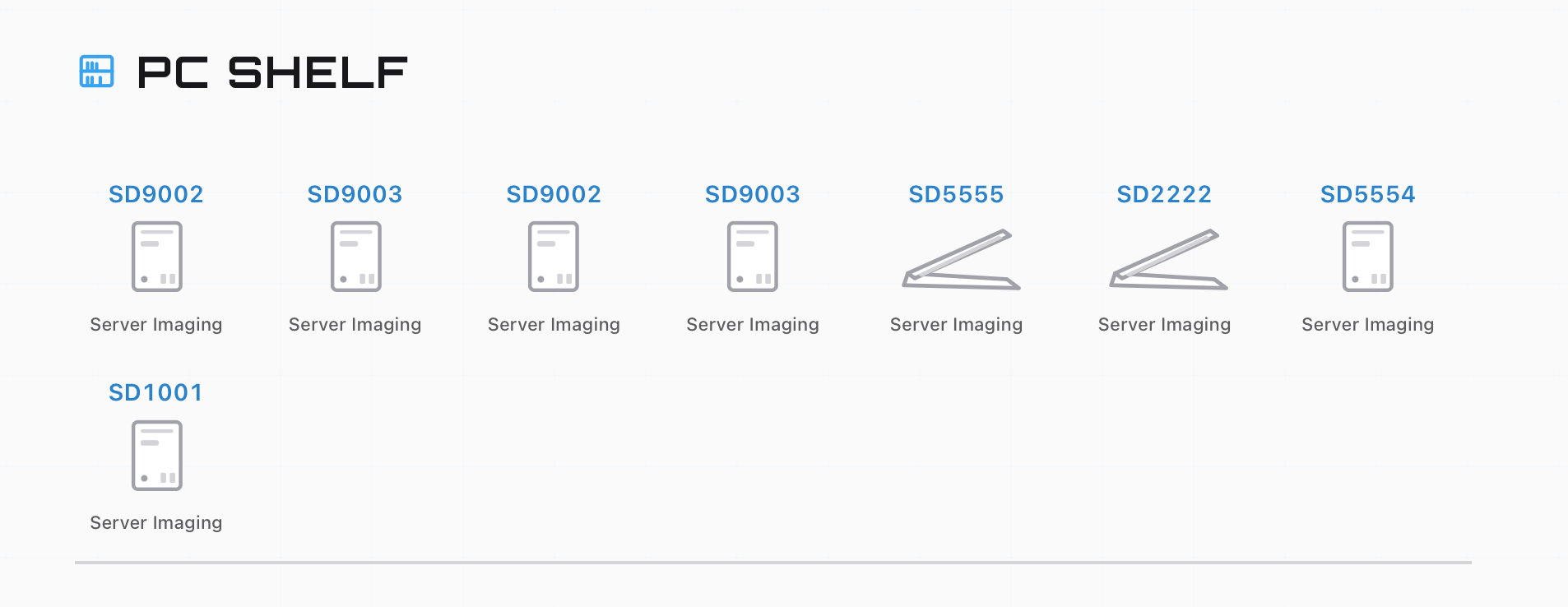
The PC Shelf showing eight built units, each with an SD name above it and its build method underneath
Eight built machines, each labeled with the name it was given and the build it carries. Desktops draw as a tower, laptops as a clamshell.

Each unit shows two facts. Above the art is the name the machine was given during the build. Under it is the build it carries, Server Imaging or Manual Domain Enrollment, and Cloud Provisioning once that build ships. That second line is the one that matters when you are picking a replacement, because a dead call-center desktop needs the imaged build and a shared kiosk needs the hand-built one. Picking the wrong build off the shelf is the most common way to fail a replacement ticket.

At the foot of the shelf there is a count and Open Ship Manager, which is the door out. Units leave three ways worth remembering: shipped from the Ship Manager, handed over as part of a day-one kit with Check out kit, or taken for a specific job with Check out replacement. Every one of those consumes the unit. Checking a unit out from its own record, or registering it as anything other than stock, takes it off the shelf too.

A unit gives you a name, a build, and the fact that the machine is physically there. Who holds one, what state it is in and when it is due back are questions for the register, which is a different tool and the whole subject of Asset Management.

Built, then booked in

A finished build lands on the shelf immediately, and it becomes stock at a second step. In Asset Management it shows as Needs registration, and a checkout takes it once you have registered it.

Registering is the tagging step, and it happens in Asset Management: New asset, pick the unit, Register asset it as Ready to deploy, and it becomes countable stock the register can hand over.

So the count at the foot of the shelf is the number of machines physically there, which is also the number the Ship Manager will let you send. What you can hand to a person is the registered part of that count, because a checkout only accepts a registered unit. Those two numbers differing is normal in a real stockroom, and the gap is always paperwork nobody has done yet.

On the shelf hereWhat it is in a real stockroom
A unit drawn on the PC Shelf A built machine physically on the shelf
The name above the unit The asset label stuck on the lid before it was shelved
The build under the unit The image the machine carries, which decides who it can go to
Needs registration Delivered and built, sitting in the room until somebody tags it and books it in
Ready to deploy Booked in, counted, available to hand out
Check out kit Issuing a full day-one set to a starter
Check out replacement Pulling a specific unit for a named job
Open Ship Manager The shipping desk, the only door out of the room
A retired unit id The movement log line that keeps each unit counted exactly once

A stockroom system adds the layer that keeps a shelf stocked, and part one is where each piece came from: a reserved state that holds a promised unit for the person it was promised to, a minimum and a reorder point that raise a purchase request on their own, a supplier and a lead time behind that request, and a due date on every loan. Here the shelf tells you it is empty at the moment a ticket needs a machine, which is, in fairness, how most people find out at work too. Keep a spare or two built ahead of the queue in both places.

Part three

Practice

Build a machine onto the shelf, then take one off it for a ticket that needs one.

Open this module in the simulator