What the company owns, who has it, and what state it is in. Boring until an auditor asks, and then it is the whole job.
Asset management is quiet work until an auditor asks a question, or until somebody leaves and takes a laptop nobody wrote down.
Part one
On the job
The hardware and software register a real IT department runs on, from the loading dock to the disposal certificate.
The lifecycle of one laptop
Every machine a company buys goes through the same life, and IT owns all of it. Each stage has a name because each one is a handover, and a handover nobody wrote down is where equipment quietly goes missing.
From the purchase order to the disposal certificate
ProcureSomebody approves the spend and a purchase order goes to a supplier. The PO number is usually the first fact ever recorded about that laptop.
ReceiveIt arrives at the dock, and someone checks the carton against the delivery note and the PO, because finance will pay the invoice against that check.
TagA durable label goes on the chassis and the machine gets a row in the register. Until that happens it has no row in the register, and no report the company runs will show it.
DeployBuilt, assigned to a person or a location, handed over. The record gains a holder and a date.
MaintainRepairs, warranty claims, part swaps, moves from one person to the next. The only stage that repeats, and every pass edits the record.
DecommissionOut of service. Still on the books, no longer in anyone's hands.
DisposeIt leaves the building for good: collected by a specialist disposal vendor to be wiped, then recycled or refurbished, leaving a wipe certificate and a disposal record behind it.
Seven stages, and the register only starts carrying the machine at the third one. From there every stage is a write to its row. Skip one and the register drifts quietly, and you find out months later when the count on the books stops matching the shelf.
What the tag is for
An asset tag is a printed label with a unique number on it, stuck somewhere you can read it without taking the machine apart. The tag is your company's own number for the machine: the serial number identifies the hardware to the vendor and you will need it for a warranty claim, while the tag is what identifies the machine to you.
It matters because everything else about a machine changes. The hostname changes when it is rebuilt. The user changes when someone moves team. The operating system gets wiped. The tag on the lid is the one constant, and it is the thing you ask a panicking user to read out down the phone.
The register, the CMDB, and the holder
The register is one row per asset, and the discipline around it is IT asset management, ITAM, which is the phrase job ads use. It exists to answer five questions without anybody walking to a cupboard: what do we own, where is it, who has it, what did it cost, and when does support on it run out.
An IT service management tool, or ITSM tool, keeps the same rows under a different name and adds what each one depends on.
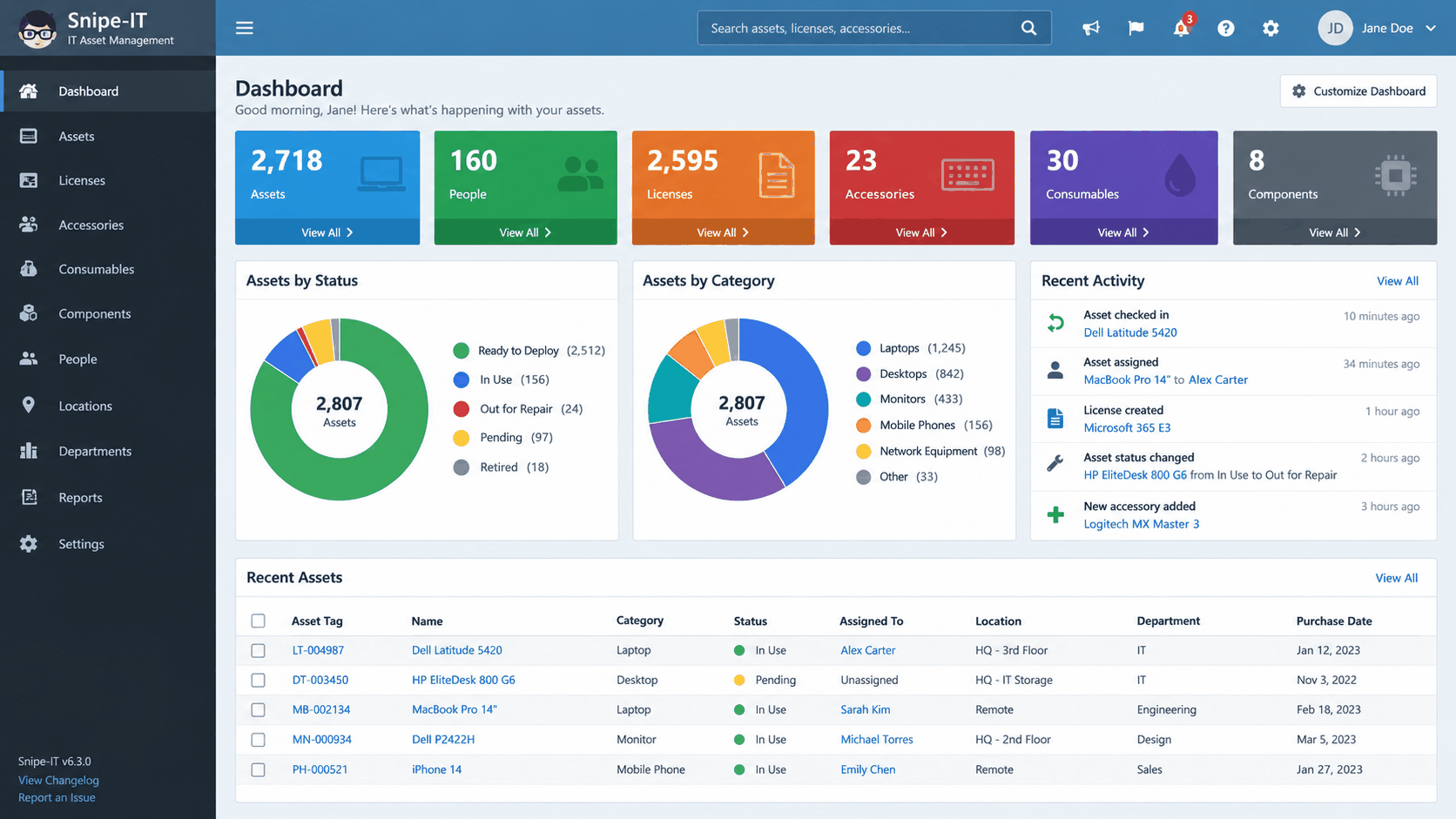
This is an illustration of a commercial register: the columns are the real thing and the numbers in it are invented, so read the columns. Asset tag, Status and Assigned To are the three that carry the weight: the tag is the only name a device keeps through a rebuild, and the other two are the pair an auditor reads against each other. Every count on the dashboard is built from those rows, so a check-out nobody recorded turns up here as a wrong number.
Snipe-IT is a trademark of Grokability, Inc. ServiceDesk Simulator is not affiliated with, endorsed by, or sponsored by them.
Configuration item (CI)
Anything under configuration control that a service depends on: a laptop, a server, a switch, a database, an application.
CMDB
The configuration management database. The CIs plus the relationships between them, so you can ask which service goes down if this host does.
Discovery
An agent or a network scan that finds what is actually out there and compares it to the register. Whatever it finds that the register does not list is a device nobody wrote down.
Asset management and configuration management overlap, and each of them answers to a different department. Asset management cares about ownership, cost and lifecycle, which is a finance question. Configuration management cares about dependencies and change, which is an operations question. The same laptop appears in both.
A stale register still gets trusted. With no register at all, people go and look. With a stale one they quote it in an audit and plan a refresh around numbers that were wrong eighteen months ago.
Who has it right now
Chain of custody
Dock
IT stock
The holder
Back to IT
Disposal
Every arrow is a check-out or a check-in, the same way a library works, and a lot of places make the person sign. Keep the holder field accurate before any other field. A price or a warranty date can be looked up again on the invoice. Who was holding a device last March is written down here and nowhere else.
The case that exposes a weak register is always the leaver. Somebody resigns, HR runs the offboarding, and the question comes to IT: what does this person have? If the answer is a laptop, a dock, two monitors and a phone, you can chase it. If the answer is a laptop we think, then a data-bearing machine has walked out of the building and nobody can say what was on it.
Warranty, leases, and the licensing bill
Hardware you own, and hardware you rent
Every machine carries a warranty end date, and it is the field that decides what you do on a Tuesday morning: in warranty means the vendor sends an engineer or a part, out of warranty means you are buying one or pulling a spare off the shelf. Techs who know how to read the register get to the answer in ten seconds instead of forty minutes.
Leased hardware is stricter: the fleet goes back on a fixed date, and anything missing on the day is charged at a price nobody is happy about. Refresh cycles sit on top of that, most places running laptops on a three to four year cycle and planning the spend by counting how many machines cross that age in the next budget year. That count comes out of the register, so bad data here lands as a wrong number in somebody's budget.
Software is where the money actually is
Software asset management tracks entitlements, which is what you are licensed for, against installs, which is what is actually deployed. The difference is your exposure, and it runs in both directions.
Entitlements against installs
More installs than entitlements
1Three hundred installs against two hundred licenses.
2An audit ends in a true-up invoice at list price, with no discount and no time to negotiate.
More entitlements than installs
1Paid licenses sitting on the accounts of people who left.
2Free money, and the reason a leaver checklist has a license step in it as well as a hardware step.
Microsoft, Oracle, Adobe and SAP audit for the left-hand one, so that one gets found for you. Nobody audits you for paying too much, so the right-hand one gets found only when somebody goes looking.
The end of the line
A retired laptop leaves the building by a controlled route, and two separate rules put it there.
The first is data. The drive holds company files, cached credentials and somebody's saved passwords, so it gets sanitized before it leaves. NIST SP 800-88 is the standard people quote, and it names three levels: clear, purge and destroy. A certified wipe leaves you a report per serial number; a shredded drive leaves you a certificate of destruction, which is the piece of paper your security team will ask for.
The second is waste law. Electronics are regulated waste in most of the world, so retired kit goes to an ITAD vendor, an IT asset disposition company, who collects it, wipes or shreds it, resells what is worth reselling and documents the rest.
What happens after decommission
Decommission
Sanitize
ITAD collection
Certificate
Reconcile
The vendor hands back a certificate and an itemized list, and that list is reconciled against the register. Anything on the list that was not on the register, or on the register and not on the list, is a question somebody has to answer.
The tools that do this
Tool
What it is for
ServiceNow ITAM
The enterprise answer, sitting on the same CMDB as the ticketing.
Snipe-IT
The open-source register a smaller shop runs. A good one to install at home for an afternoon, so you can talk about tags and check-outs from experience.
Lansweeper
The discovery side: scanning the network and telling you what is really there.
The interview answer worth having ready: asset management is boring until an auditor asks, or until somebody leaves with a laptop nobody logged. Say that, then say which field you would fix first, and why it is the holder.
Part two
How this works here
The same register in this product: what a record holds, and what checking something out does to it.
The register in this product
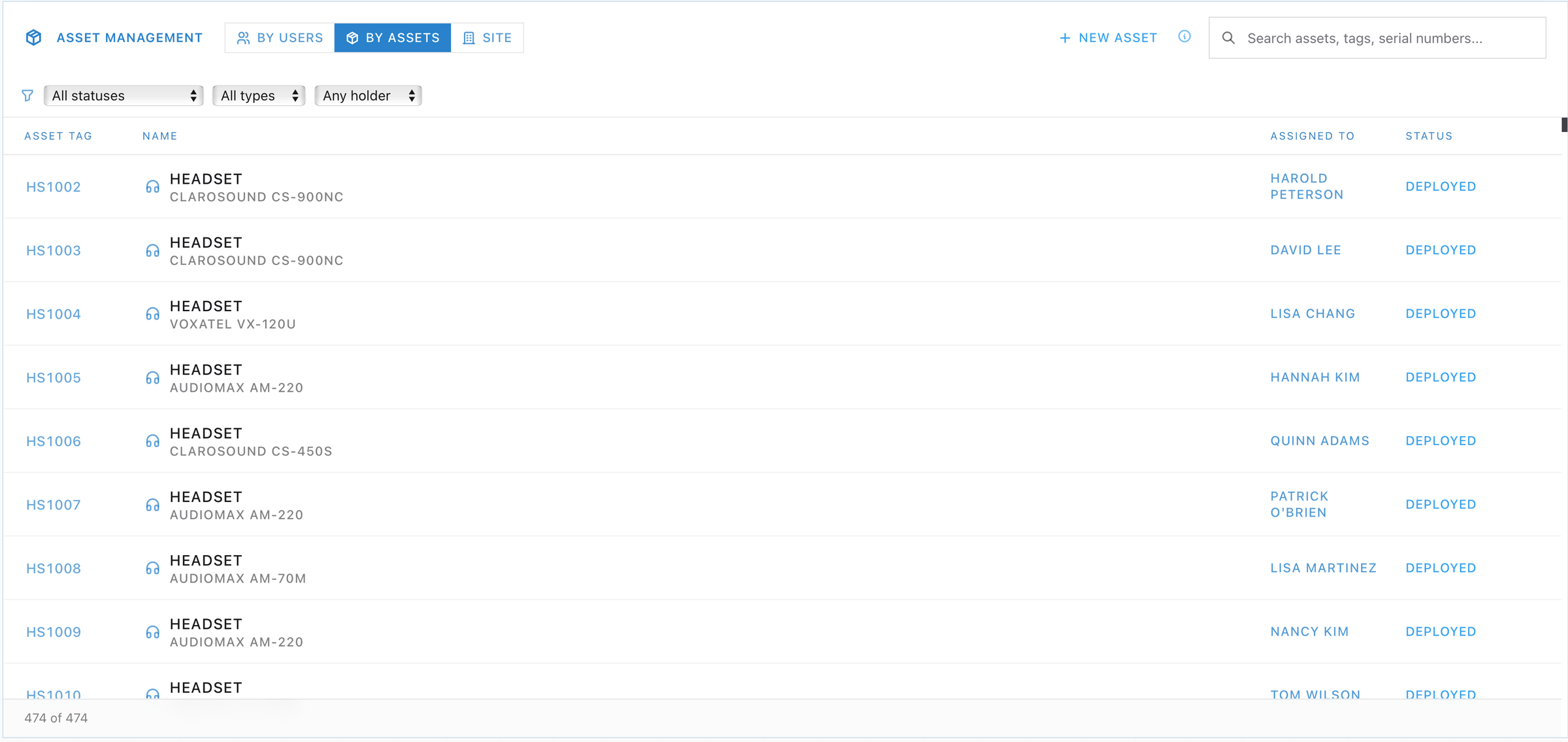
Tools, then Asset Management. It opens on a list of every tracked device with three ways to read it: By users, which is one row per person and what they hold, By assets, which is one row per device, and Site, which holds the shared equipment that belongs to the building rather than to a person, like a loading dock kiosk.
Nearly five hundred rows is what an auditor actually asks to see, and Status is the column they read first. A row reading Deployed with nobody actually holding the device is hardware the company can no longer account for. Note that every headset gets its own row: peripherals are assets too.
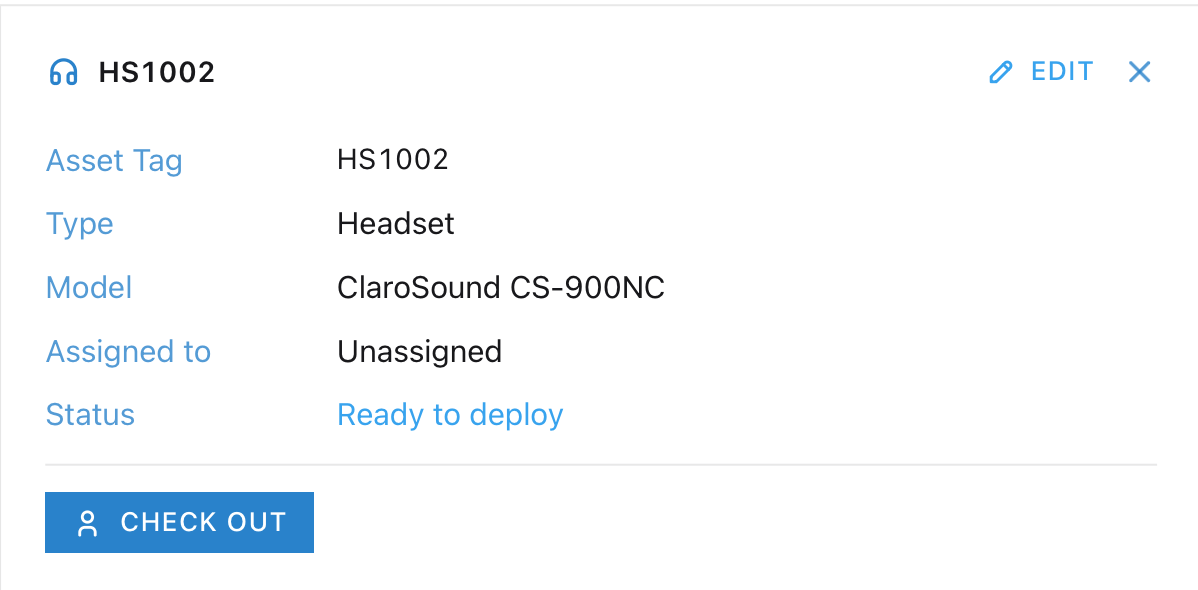
Open any row and the record holds Asset Tag, Type, Model, Hostname when the device has one, Assigned to and Status. Peripherals are tracked separately from the computer, so one person's kit is five records: the machine plus a monitor, a keyboard, a mouse and a headset, each with its own tag.
The tags are readable on purpose. A person's peripheral tags hang off their computer's tag, so SD1006 brings MN1006, KB1006, MS1006 and HS1006 with it, and you can tell at a glance which set belongs together.
One coincidence to name before it confuses you: in this product a computer's hostname matches its asset tag, so Quinn's desktop is SD1006 in both fields. That is a simplification of the sim, one number per machine. In a real fleet the two are different strings and the rule from part one still holds: the hostname changes on a rebuild while the tag on the lid stays the constant.
On By users, the people list comes from the directory, read live. That is the same arrangement as an HR or directory feed into a real register: the roster is owned somewhere else, and the register reads it from there. In a real register that feed runs on a schedule, which is the job Sync from AD stands in for here. Pressing it clears whatever you had searched for, pauses the way an import would, and reports the head count along with how many of those people have no computer against their name. That second number is the one to note: every person in it needs a machine.
Every state a record can be in
Every record here carries exactly one of these six statuses. The status belongs to the record, so a machine picks one up at the moment somebody registers it.
In circulation, and on the books anyway
Available or in use
1Ready to deploy: available stock. Nobody holds it, and it can go out today. Spare monitors, keyboards, mice and headsets sit here.
2Deployed: somebody holds it. The record names the holder, and it is what the directory reads back when you ask what machine a person has.
3Needs to be imaged: returned or reclaimed hardware that has been used. Back in IT, and it goes out again once it has been built.
Out of circulation
1Broken: the hardware failed and it has been pulled out of service. Unassigned, and still on the books.
2Decommissioned: end of life. Off the road, still on the books, which is exactly why a real register keeps its retired rows.
3Lost: shipped to the wrong place or never recovered, and written off.
The right-hand column is kept on purpose. Broken, Decommissioned and Lost stay in the register after they leave circulation, because deleting the row leaves a list that no longer matches what the company bought.
Status and Assigned to have to agree. Ready to deploy with a holder stamped on it, or Deployed with nobody in Assigned to, is a row that will send the next technician to an empty shelf.
Needs registration appears in the same list, and it is a condition rather than a seventh status. It marks a computer that has been built and has no row here yet: the machine sits on the shelf and can be found by name, and with no record there is nothing to carry a status. Registering it creates the record, and the record opens on whichever of the six you pick, usually Ready to deploy. That is the tag-before-shelving rule from PC Shelf, enforced in software.
What a checkout does here
Checking a device out is how custody gets recorded. On an available record, Check out opens a searchable list under Check out to, and picking a person hands them the device: the status flips to Deployed and the holder is stamped on the record.
What each direction writes
Check out
Check in
Computer
Deployed, holder stamped
Back on the ready shelf
Peripheral
Deployed, holder stamped
Straight back to the spare pool
Check in hands a device straight back to stock: a computer returns to the shelf it came off, a peripheral to the spare pool. The path that sends a used machine to Needs to be imaged is the offboarding Return device, which part three works.
Three checkouts are framed around the job, and they live on the person's record: Check out kit, Check out replacement and Return device.
Check out kit
The day-one handover for somebody with no machine at all: a laptop plus a monitor, keyboard, mouse and headset, claimed in one action. It wants a laptop specifically, so the shelf has to be holding one.
Check out replacement
For somebody who still holds a dead machine. It hands over the new one and leaves the old record standing, and it only accepts a unit of the right build and the right device type.
Return device
The offboarding path. It runs once Include return label is ticked, because the label is what physically carries the device back to IT.
A machine goes on the books the moment somebody registers it. A freshly built machine lives on the PC Shelf until then, and appears here as stock as soon as its record exists. Everything else, including every peripheral and every broken or retired machine, lives here.
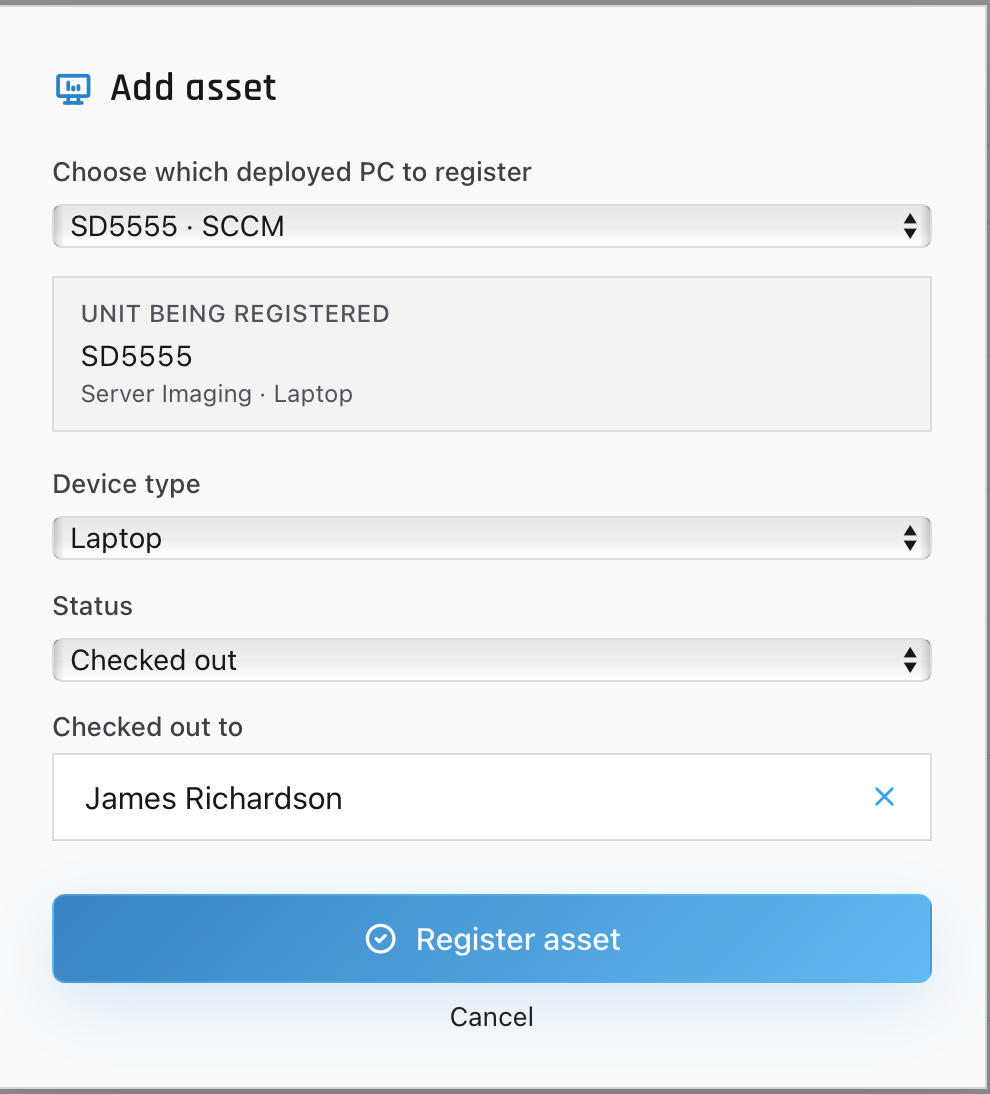
To bring a build into the register, use New asset on the By assets view, choose the machine's type and its starting status, and press Register asset. The dialog registers a machine that was already built, so it carries that unit's hostname for you, and it asks which unit only when more than one build is waiting. Pick Ready to deploy and that is goods-in and tagging in two clicks. The dialog calls the held state Checked out, which the list and the record call Deployed, and picking it adds a Checked out to field the dialog will not submit without.
Registering the machine is the last step of building it. Decide the type and the starting status here, while the unit is still in front of you: a machine that was imaged and handed over and never entered on the books is invisible to every report the company runs.
Our register against a real one
What this panel shows
What it is called in a real ITAM register
Asset Tag
Asset tag / asset ID, the number printed on the label
Type
Asset class or category (laptop, desktop, monitor, peripheral)
Model
Make and model, from the catalog of approved hardware
Hostname
CI name, the name the machine answers to on the network
Assigned to
Assigned user, holder or custodian, the chain-of-custody field
Status
Lifecycle state (in stock, in use, in repair, retired, disposed)
Site
Location or cost center, the field that owns shared equipment with no single owner
Sync from AD
Directory or HR feed into the register
Register asset
Goods-in: receiving a unit and tagging it onto the books
Three more columns sit on a real register, and part one already told you why each one is there. The finance fields, purchase order, price, supplier, warranty end date and lease return date, are what an auditor asks for, and the warranty date is the one a first-line technician opens most: it decides whether Tuesday morning is a vendor engineer or a purchase request.
The vendor serial number is the second, and the machine carries it alongside the tag. The tag is what your company decided to call the machine. The serial is what the manufacturer calls it, and it is what a warranty claim or an RMA is raised against. Tags fall off; a serial is stamped into the chassis, which is why a good record holds both and why the search box here reads Search assets, tags, serial numbers....
The third is the handover history, drawn on the record as a list: every move from one holder to the next with a date on it. That is the audit trail, and after a laptop goes missing it is what tells you who had it last and on what date. The disposal end of the same chain is the certificate part one described, filed against the record so the two can be read together years later.
What you practice here is the part a service desk technician touches every day: what exists, who has it, and what state it is in. Carry the rest into the interview, where the warranty date and the disposal certificate are the two answers that sound like somebody who has worked a real register.
Part three
Practice
Look a person up, read their devices, and work a request for a machine.