Somebody leaves a message with half the facts and no callback number. Turning that into a ticket you can work is a skill, not a formality.
A voicemail carries only what the caller happened to say, and nobody is on the line to answer a follow-up question.
Part one
On the job
Phone intake as a skill: everything you have to get out of a caller before they hang up, the callback number, and the gap between what somebody reports and what is wrong.
What every call has to produce
This module is about intake: taking a message somebody left, or a call you pick up, and turning it into a ticket another tech could work cold. Answering the phone itself, steering the call and closing it while the person is on the line, is Module 6, The phone.
The Voicemail Inbox is a Pro tool. On a free account the panel shows an upgrade prompt, so if that is you, read this module as teaching: the craft below is the same on any desk, and the hands-on drill in part three is there when you are on Pro.
On the phone you are conducting an interview, typing a record, and calming somebody down at the same time, while the person is still talking.
You can ask a follow-up question and get an answer in two seconds. Everything in the record is there because you typed it while they spoke, and when the caller hangs up, anything you did not ask is gone until you ring them back.
Four steps, in this order, on every call
Take control
Get the facts
Say what is next
Leave a record
All four run while the caller is still talking, so practice the order until you stop deciding it.
Write the call up so the next person to touch the ticket can work it without ringing the user back.
What you must have before you hang up
Learn this list in this order until you can run it without thinking, because you will be running it while somebody is shouting at you.
Seven things you take off every call
WhoFull name, plus their username, employee number or department, so the directory can find them. Ask them to spell the name. On anything security-related, take the identity and then run the rest of the verification before you change anything.
A callback numberThe number to reach them on today, the one they are sitting next to as they speak. Take it at the top of the call, alongside their name and before you get into the problem.
What is happeningIn their words, with the error message read out exactly. If they paraphrase it, ask them to read the screen to you character for character.
What changed, and whenWhen did it last work, and what happened in between. A new laptop, a password change, an overnight patch, a move to a different desk. Ask a second time if the first answer is that nothing changed.
How many peopleJust them, their team, the whole floor. Ask it on every call: the answer sets the priority.
What they triedAsk before you suggest anything, so your first instruction is something they have yet to try.
The deadlinePayroll at noon, a board presentation in an hour. Ask what happens if it is still broken tomorrow.
On a good call you have all seven inside two minutes, and most of them arrive without being asked, as long as you let the person talk first.
Three live-call habits sit around that list, and all three need a line that is still open. You confirm the list by saying it back and waiting for the yes, and you hand a caller on by staying with them until the next person has picked up: both are worked in The phone. Getting a real error string out of somebody who will only describe the screen is worked in Company Chat. A voicemail gives you one pass. The read-back, the handover and the follow-up question about what the certificate warning actually said all need somebody on the line, so a message leaves you whichever of the seven the caller thought to include.
Getting a number you can ring back
The number is the second thing you take, after their name and before the problem. That is where The phone puts it too: the desk they have reached, your name, their number, then the fault. You can work around the rest: guess at the fault, look the person up, read their record. Without a number the message stops where it is, and the person believes they have logged a call that nobody can progress.
The number on the record, and the number you ask for
The number on the record
1It is the desk phone, and the caller is at home.
2They moved team and the record stayed behind.
3It rings at a desk the office reshuffle emptied.
4It is the soft phone on the very laptop they are calling about.
The number you ask for
1Asked for at the top of the call, before the problem.
2Read back digit by digit.
3Written in the ticket even when it matches the directory.
Ask for the number even when the caller says you already have it.
On your own outgoing message, follow the advice you give users: your name, your number, and the one-line reason you are calling, at the start and again at the end.
Here the sim clips the extension to every message, so the person is always reachable and you can drill the rest. On a real desk you ask for the number yourself, on every call.
What they report, and what is actually wrong
A user reports what is on their own screen. The table below is what those reports usually turn out to be.
What they report
What it usually is
"The internet is down"
One machine that cannot reach one thing: a broken wireless profile, a cable out of the back of the dock, one internal site down, a filtering change on one address. Very occasionally the line really is dead, and asking about scope is what tells you.
"My email is broken"
One message that never arrived.
"The printer is broken"
One queue on one machine, while everybody else on that floor prints fine.
"My computer has a virus"
Usually a browser full of adverts, until they mention a link they clicked or a program they do not recognize, which is a real security ticket and gets handled as one.
Four questions close the gap:
Who else
Is anybody near you seeing this? One person is a device or an account. A floor is infrastructure.
Since when
And what happened just before that. A patch, a password change, a new machine.
What else
Does anything else work? If one site loads and another does not, the line is up and the fault is on one machine or one address.
Somewhere else
Does it fail on a different machine, a different network, a different account? A fault that follows the account is in the record. One that stays with the desk is on the machine.
Then write both. The caller's words go in the ticket as the reported symptom, because that is what the next person will search for and what the user will recognize when they read the update. Your reading goes in as the diagnosis, clearly labeled as yours. Leave their description standing and put the theory beside it, so a wrong theory still leaves the original evidence on the ticket.
Part two
How this works here
The Voicemail Inbox, what a message carries, and exactly what lands in the ticket when you turn one into work.
The Voicemail Inbox
Voicemails sits in the header next to the call controls. It is a Pro tool: on a free account the panel shows an upgrade prompt, and the inbox behind it stays empty, because the incoming calls and the messages that fill it are part of Pro. Part three says what to practice instead.
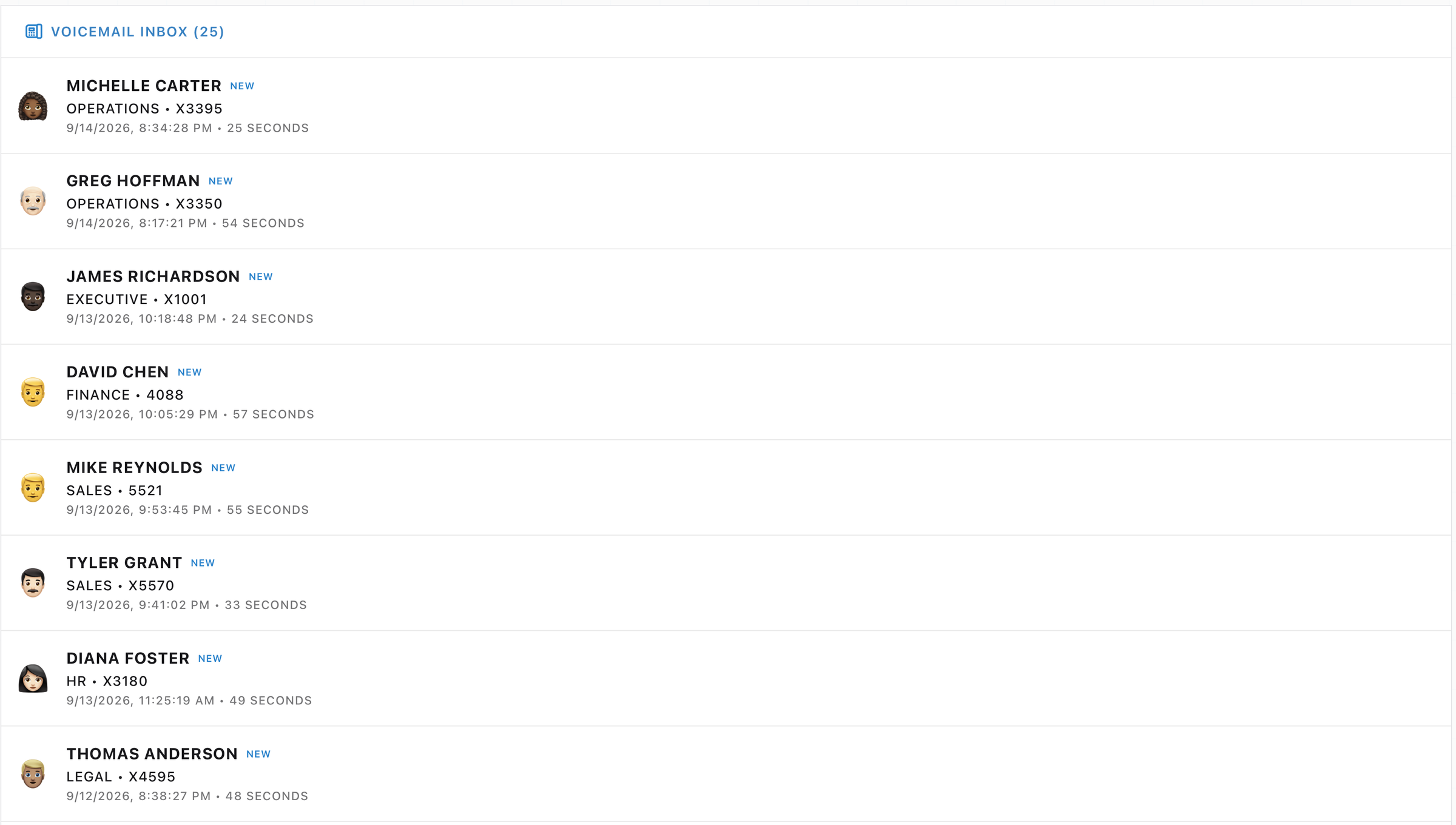
The panel is a single list headed Voicemail Inbox with the count beside it. Empty, it says No voicemails yet, and under that, Voicemails arrive while you play. Pro only. Messages land on their own while you work the queue, so the list grows whether or not you ever miss a call. A message becomes work at the moment you raise the ticket. Until then the rest of the desk cannot see it.
Read the department and the extension before the name: those two fields let you order a full inbox before you know what any of the faults are. Several messages from one department is usually one fault shared by a floor, so it goes first. A department the day runs on, the people taking customer calls or processing payroll on a run day, outranks one that can wait an hour. And several messages from the same extension usually means one person calling back.
A message arrives two ways: when you decline a call or let it ring out, and from the recurring callers, who drip messages in on their own while you work the queue. That drip is the one part with a limit.
When the desk drips you another message on its own
A caller new to the inbox
A caller you already have
Fewer than four unheard
A message can drip in
One per caller is the cap
Four already unheard
The drip pauses
The drip pauses
This is only the automatic drip: it holds off once four messages are unheard, and it allows one message per caller, so somebody who already has one waiting, or an open ticket, gets skipped. Declining or missing a call goes straight through whatever the count is, so a busy inbox stacks well past four. Clearing a few to read is what frees the drip to resume.
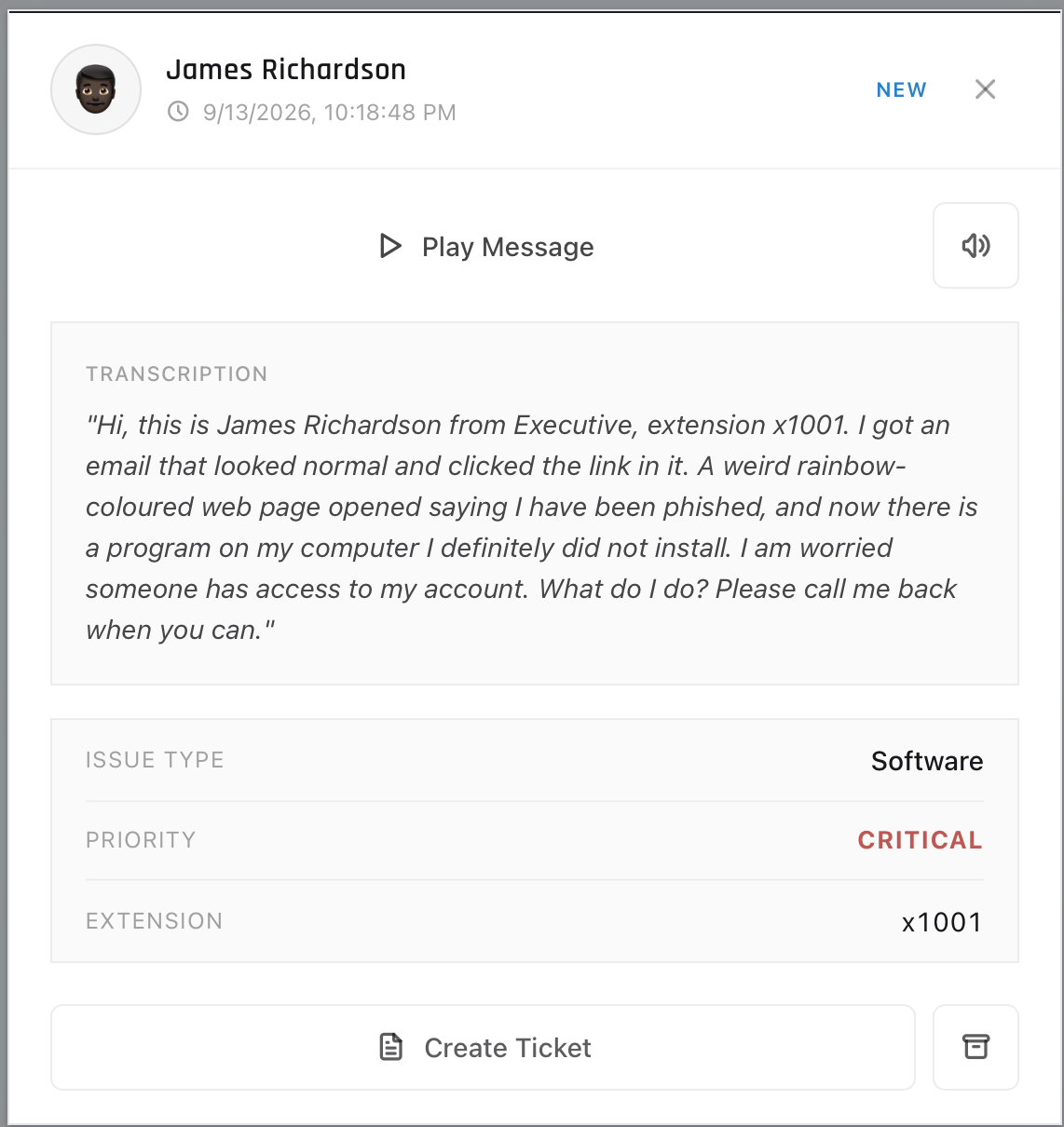
Opening a message gives you the playback controls and the message itself. Play Message reads it out in that caller's voice; the speaker button next to it silences playback. On a text-only message the same control reads Mark as Read. Either way the words are underneath, in the Transcription block, which carries the whole message on its own.
Below that are three rows of metadata: Issue Type, Priority and Extension. All three were set before you opened the message. On a live desk you set priority yourself, from impact and urgency, which is the subject of The ticket queue.
From a message to a ticket
Create Ticket at the bottom of the message opens a short ticket form, already filled in from the voicemail: the caller's words are sitting in the description, with the issue type and priority the message carried. You can edit any of it before you file. Submitting builds the ticket from what is on the form, drops it in your queue, archives the message and marks it heard, and credits you for logging it. Archive next to it clears a message and raises nothing, for the ones you have decided need no ticket.
Three separate facts are sitting in this one message: a link he clicked, a program he does not recognize, and an account he is worried about. Work out which of them the ticket is actually about before you file it, because the transcription is the only record you get and nobody rings back to say it a second time.
The ticket is about the program he does not recognize, appearing right after a link he clicked. That pairing is a possible malware install, which is a security issue and the one thing here that outranks everything else. This is the case the virus row on page four was pointing at: "my computer has a virus" stops being adware the moment a clicked link and an unknown program turn up together. The account he is worried about is the consequence he fears, and the fault sits upstream of it. So file it as a security ticket, keep all three facts in the transcription so the whole sequence stays on the record, and make sure the link and the program are the part the next person reads first.
The ticket body has a fixed shape. It is stamped Created from voicemail and then carries Caller:, Extension:, Employee ID: and Department:, followed by Transcription: with the message in quotation marks. When a message arrives with no words attached, that last block reads Voicemail transcription unavailable, which is your cue that the only evidence is whatever the metadata gives you.
That layout is the intake list from part one: identity, contact, department, then the user's own words preserved exactly.
If a ticket already exists for that caller and that issue, the button refuses and names the ticket you already have, so one fault does not end up with two records.
What the message hands you
What a live call would have given you
Caller name on the row
A voice you can ask to spell it, and a person you can verify while they are there.
Department and extension, already attached
A callback number you have to ask for, read back, and record yourself.
Timestamp and duration
A conversation you can time, and a queue that shows how long they waited before you picked up.
The transcription, in one block
A conversation you can steer: the follow-up question, the scope check, the read-back.
Issue Type and Priority, already decided
Your own read of impact, taken from the deadline the caller told you.
Create Ticket, one press
A ticket you type while they talk, and read back to them before you hang up.
The right-hand column is the one you will be working in at a real desk. Both rows about the callback number point the same way: you ask for the number, you read it back, and you write it down yourself, because the number in the ticket is what the next tech dials. Here the extension rides on every message, so the inbox is where you drill the reading.
Create Ticket is how the work leaves this panel. Ringing the caller back becomes a step somebody else can see, because the ticket says it is owed.
Part three
Practice
Take a message somebody left and turn it into a ticket another tech could pick up cold.