A live caller is the hardest surface on the desk: no time to think, no edit button, and somebody angry on the other end. The skills are learnable.
On every other channel you get a second pass. On a call you are interviewing, diagnosing and typing at the same time, out loud, in front of the person waiting.
Part one
On the job
The live call as the phones actually work it: the opening, verifying a voice, calming somebody down, fixing something you cannot see, and the metrics watching all of it.
How a call differs from a ticket
A ticket can be reread before you answer it. A chat message can be rewritten before you send it. A call happens once, at the speed of the person talking, and everything you say is heard as you say it.
The same job, two different jobs
A ticket you pick up
1The facts are already written down.
2You can look something up before you reply.
3A bad sentence gets deleted.
4You think in private.
A call you answer
1The record starts when you type it.
2Every pause is audible.
3What you said is said.
4The person is listening to you work.
Desks train phone handling separately from ticket work, and quality reviewers score it separately too.
The rest of this part is a small set of moves. Drill them until they run without attention and they still come out when somebody is shouting at you.
The first thirty seconds
Open the same way every single time, so the opening runs itself and your attention stays on the listening. It starts with where they have landed, then your own name: "IT service desk, this is Sam."
The opening, in order
Which desk they reached
Your name
Their name
A callback number
Then the problem
The desk comes first because the caller needs to hear that they have reached the right place. The number comes before the problem because a line that drops halfway through the story leaves you a mystery and no way to finish it.
Say what you can do as well as who you are. "IT service desk, this is Sam, I can reset accounts and get remote onto your machine" tells the caller in one breath whether they have reached the right place, and heads off the ten-minute story that ends in a transfer.
Ask for the number they are sitting next to right now, and read it back before you ask anything else. Calls drop. Phones die mid-sentence. People call from a meeting room, a car, a corridor. If the line drops before you have a number, the fault is still there and you have no way to reach them.
The rest of what you must get before you hang up, and the four questions that separate the report from the fault, are in Voicemails.
Let them finish, then say it back
Active listening is a training term for two unglamorous habits. The first is letting the person finish. An upset caller has a speech prepared and they will deliver it whether or not you interrupt, and interrupting only makes them start again. Thirty seconds of quiet usually hands you the symptom, the scope and the deadline without you asking for any of them.
The second is the read-back. When you have it, say it back in your own words, compressed: "So since the update last night, the finance application opens and then closes, it is only on your machine, and you need it working before the payroll run at noon. Have I got that right?"
The middle of every call, in order
Let them finish
Say it back
Get a yes
Say what is next
The read-back does four things at once. It proves you were listening, which drops the temperature of an angry call faster than any apology. It catches your own mistake while the caller can still correct it. It converts their story into ticket language in front of them. And it ends with a question, which hands the call back to you.
The callback number is one of many. Read back every number and every name: extensions, asset tags, error codes, the spelling of a surname. A digit you guessed wrong means ringing back to ask for it again.
Verification by voice
In September 2023 an attacker group called the MGM Resorts help desk and talked a technician into resetting multi-factor authentication on a privileged account. Ten minutes on the phone, by the attackers' own account as relayed by the researchers at vx-underground, and then days of outage across Las Vegas properties and a hit MGM itself put at around a hundred million dollars. The ALPHV group claimed to have deployed ransomware; MGM has never publicly confirmed that part. Caesars Entertainment went the same way weeks earlier, through an outsourced IT provider. Both breaches started with a phone call to somebody doing the job you are learning.
What the attack sounds like
UrgencyA board meeting in ten minutes, payroll closing, a client on hold. Real urgency exists, which is what makes the manufactured kind work.
SeniorityThe higher the claimed rank, the more valuable the account and the harder it should be checked. Rank is a pressure tactic, not a credential.
A reason the check cannot be doneThe phone is in a drawer, they are abroad, the number on file is the old one. Every version of it is an argument for skipping the check.
Facts about the employeeTitle, manager, start date, all public or purchasable. Knowing things about somebody is not being them.
"Before I can do that, I am sending a code to the contact on your directory record. Read it back to me." Send the code to the number on the record and wait for them to read it back. It works because it swaps a knowledge check for a possession check: anyone can recite facts about an employee, but holding what arrives at the number on file is harder to fake. A caller who is who they say they are reads the code straight back; an impostor reads something that does not match, or argues about why they cannot get to it. Calling back on the number in the directory proves the same thing the same way, and is the right move when there is no code to send.
A code or a callback reaches whoever is holding that number. A SIM swap, where an attacker talks a mobile carrier into moving a victim's number onto a SIM they control, puts an attacker in that position. High-risk asks, an MFA reset, a new registered device, anything privileged, need a second check off the phone line: approval from somebody who is not the caller, a video call against photo ID, or a Temporary Access Pass, a short-lived one-time code IT issues so someone can register a new sign-in method without their password or phone, sent through a channel you already trust.
The mechanics, codes and what a directory record can actually prove, are in Directory.
The angry caller
Somebody shouting at you at 9am is carrying something that happened before the call. They lost work, missed a deadline, got passed around, or were told three times it was fixed. You are the first person who picked up.
Two sentences that sound alike
Apologize for the situation
1"I'm sorry this has cost you the morning."
2True, useful, and commits nothing.
3Names what happened to them.
Admit fault
1"I'm sorry we broke your laptop."
2A claim about cause you have not established.
3It gets quoted back at you, and at your manager.
Acknowledge the cost every time. Concede the cause only when you know it.
Then work your own end. Drop your voice below theirs and slow down: people match the tempo they are answered in, almost involuntarily. Use their name. Then run the two listening habits, worth more here than anywhere: let them finish, then say it back.
When it does not work, separate anger from abuse. Anger you absorb. Abuse you name once, calmly, with a consequence: "I want to help you with this, but I am not able to continue if the profanity carries on. If it does, I will end the call." Say it level and without sarcasm, because the sentence only works if it sounds like a boundary.
If it continues, end the call, write down what was said while it is fresh, and tell your team lead. You can also hand the call up before that point: asking a manager to take a caller who is being disrespectful is a normal escalation. Every desk with a functioning manager has that policy, and it covers you from your first week.
Fixing what you cannot see, then closing
Talking somebody through a fix blind is slow, so the temptation is to batch the instructions. That is what turns a five-minute call into twenty: when it goes wrong you cannot tell which of the four steps went wrong. Give one instruction, then ask what they see, then give the next. It is hardest to hold to in writing, so it is drilled in Company Chat.
A four-minute silence in a thread is just a gap between two messages. On a line you can hear somebody hunting for a menu several seconds before they will admit they are lost. So stop talking after each step and listen to what the quiet is doing.
You are working somebody else's screen from the far end of a line, and their focus is wherever they last clicked, so say where to look before you say what to press: "bottom left of the screen, is there a magnifying glass?" Ask them to read the error back word for word. The exact string is the thing you can search, and on a call you can hold them there until they read you the line itself.
There are two honest ways to finish, and you pick between them out loud. The first is to solve it while they are on the line. That is the better outcome nearly every time, and it is what first contact resolution measures. The second is for work that is plainly going to take a while: raise the ticket, give them the number, say when you will ring back, and then ring back. Either way the caller comes off the line with a ticket number and knows what happens next.
The close is four sentences, and it is the part most calls skip. Confirm the fix in their words, which means having them open the broken thing and use it while you are still on the line. Then give the ticket number slowly enough to be written down.
The close, in four sentences
Use it while I am here
Who has it next
The ticket number
If it comes back
The one people drop is the first, and it is the only one that tests the fix from the user's side.
Hold, transfer, and the clock on the wall
Hold and transfer are the two moves callers complain about most, and both are easy to get right.
The move
Why it works
Ask before you hold, and wait for the answer
The caller hears a question and answers it, so the silence that follows reads as you working.
Give a number, then come back on it
Tell them how long you will be, then come back on it whether or not you have an answer, and keep the number under ninety seconds: past that, people start pressing buttons.
Warm transfer: stay on the line and hand over
Reach the other team yourself and hand across a person: who the caller is, the ticket number, what you have already checked. They arrive already introduced.
Send people only into a queue you know is staffed
Check somebody is answering it before you transfer, so the call lands on a person and the caller hears the handover happen.
Before any transfer, tell the caller where they are going and why, and give them the ticket reference. Put the facts in the ticket before you brief the other team, so the next person picks it up from the record rather than from your description of it.
Around all of it sits a phone system: an automatic call distributor queues calls and hands the next to whoever is free, usually through a softphone on the computer. When a call ends you get wrap-up time before the queue hands you another, commonly tens of seconds to a couple of minutes. Use it for the notes, while the call is still in your head.
Average handle time is the number most desks watch: talk time, hold time and wrap-up added together. Chase it on its own and it rewards getting people off the phone before the fault is fixed.
What the handle-time number can hide
Fixed on the call
They call back
Short call
What everyone wants
The same job, twice
Long call
Sometimes the job
Something is wrong
The top-right square scores well on handle time and costs two calls and a repeat ticket. Read handle time next to first-contact resolution, which counts the calls that needed no second contact. A callback you promised, with a ticket number on it, is work in progress: it is recorded, and the next contact is yours to make.
Part two
How this works here
What an answered call gives you in this app, what the ticket form beside it is worth, and which real softphone control each part of the panel stands in for.
What an answered call gives you
Press Voice Call in the header and a call arrives. A free account gets one a day, then the control reads Call Used until midnight. On Pro, calls also arrive unprompted while you work the queue.
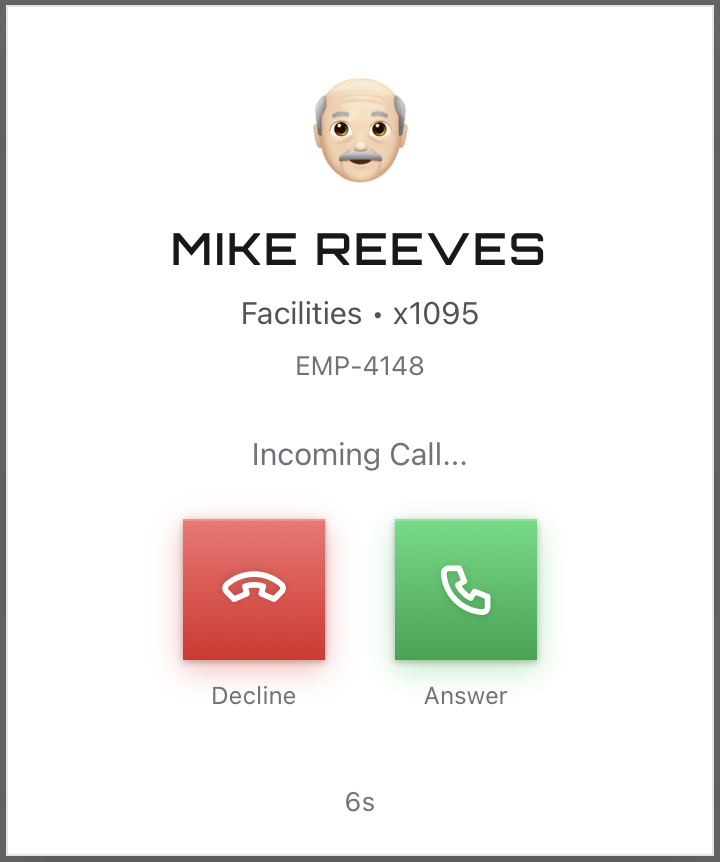
Four of the fields the form is about to ask you for are printed on this card, and the card is gone the moment you press Answer. Read it before you answer.
A call here, from ring to hang-up
It ringsA card with the caller's name, department, extension and employee number, and two controls: Answer and Decline. Both stay inert for a beat so a stray click cannot answer for you, and a countdown runs from twelve seconds. Decline an unprompted call, or let it ring out, and the caller may leave a voicemail.
The caller is realThe dialogue is generated live, in a persona, and spoken in that employee's own voice. Answer with the microphone or type. Turn voice off and the header reads Silent Call Mode: the call runs typed.
The line drops wordsWhen a reply fails to arrive the transcript says so: the caller did not catch that, say it again. Deliberate, because real lines lose words too and the recovery is the same one.
Your tools are behind the callMinimize drops the call to a draggable bar carrying Return to call. It is the only route to your tools while somebody is on the line, and the caller keeps talking throughout, so anything you want to look up happens with them listening.
An angry one is labeledAngry callers carry De-escalation call under the header, and a ticket submitted on one adds fifteen points on top of the accuracy score.
Ten minutes, then it endsAt nine minutes a countdown tells you to submit the draft. At ten the call ends whether you are finished or not.
The form beside the transcript
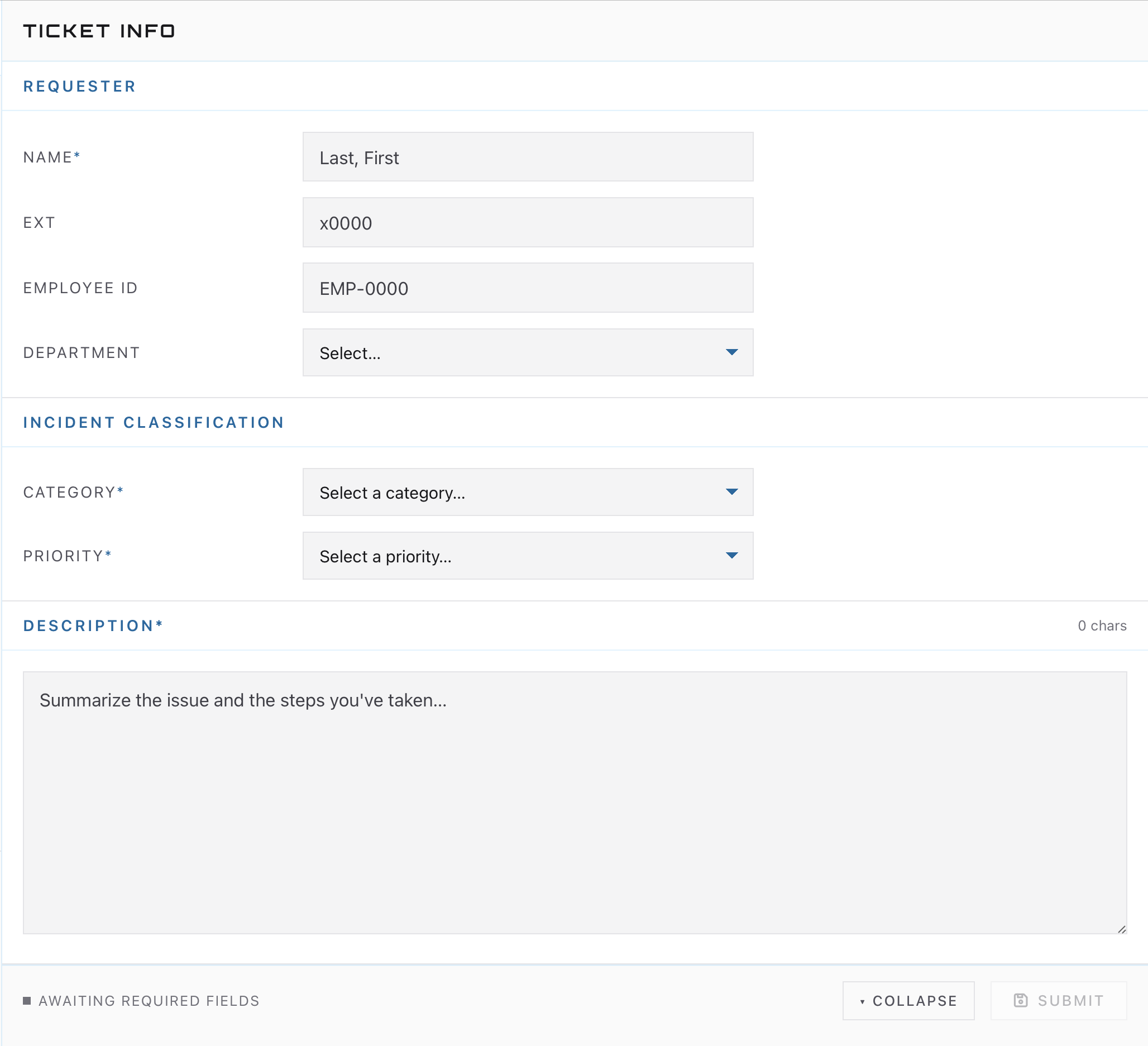
Ticket Info sits beside the conversation from the moment the call connects, in the three sections a real intake form uses: Requester, Incident classification, Description. It opens blank. The caller's identity sits in the header, and you copy it into the form by hand while they talk.
The footer reads Awaiting required fields until a name, a Category, a Priority and a description are in, then flips to Ready to submit. Submit files the ticket mid-call. Collapse is a second Minimize: it drops the whole call to the bar. Hang up without submitting and there is no ticket and no points.
Every field starts empty. The caller says their extension once, early, so open the form as soon as the call connects and type while they talk.
It feeds the same ticket a voicemail's Create Ticket does, scored the same way, but the two start you in opposite places. A voicemail opens an editable draft already filled in from the transcript, the caller's words sitting in the description for you to correct and add your own reading to before you file. A call opens this form blank and hands you a live voice instead. Voicemails works the other half.
The identity fields
Name, Ext, Employee ID, Department: five points each against the caller's real record. Twenty points, all of them readable on the incoming-call card.
Category
Ten points, level with the description and ahead of everything else. The coarse drawer is matched against the issue's finer one, so a print server fault scores as printing.
Priority
Five points, matched against what the issue is, not how loud the caller was. Forty-five in total.
Description
Ten points once it passes fifty characters, so a one-line description scores nothing.
What this panel gives you
What it stands in for
The ringing card with Answer and Decline
The softphone toast, which on a real desk also carries hold and transfer.
Minimize and Return to call
Working the ticketing system while the headset call runs, with the caller still talking in your ear.
Ticket Info open beside the transcript
The incident form docked next to the softphone, typed while the caller is still talking.
Requester and Incident classification
Caller identification and incident categorization, the blocks every ITSM intake form opens with.
The points on Submit
Quality assurance: a supervisor scores a sample of your calls against a rubric.
Silent Call Mode, De-escalation call, the ten-minute cap
Training scaffolding. On a real line the first sign of an angry caller is their voice, and nothing cuts you off at ten minutes.
Calling out is its own control. Start voice call at the top of a chat thread rings that employee, and a lockout ticket holding a temporary password carries a control that calls that user back. Both do the thing the verification page argued for: you reach the person on the number their record already holds.
Part three
Practice
Take a live call, work it to a submitted ticket, then score yourself the way a quality reviewer would.