ServiceDesk Simulator

The Support Toolkit · Module 2 of 16

The ticket queue

The list is the job. Priority is not urgency, the oldest ticket is not always the next one, and how you pick is what a manager is measuring.

A queue is a set of competing claims on one person’s afternoon, and choosing which of them to work next is a skill with rules you can state.

Part one

On the job

How priority is calculated, what the other three fields on a ticket are for, what the clocks measure, and how a real desk decides what to pick up next.

Triage, and who gets seen first

Triage is the word medicine gave IT, and it means the same thing in both places: when more work arrives than there are hands, somebody has to decide who gets seen first, and that decision is separate from the treatment.

Triage happens twice

Once, at logging

  • Somebody rates impact and urgency, and the tool turns them into a priority.
  • Done before the ticket ever reaches you.

Again, at every pick

  • You finish something, look at the list, and choose what is next.
  • Yours, and made twenty times a shift.
A ticket that stops eighty people costs eighty people’s time per minute, and a second monitor costs one person some inconvenience. First come, first served works them in the order they arrived, so the monitor request logged at 08:55 goes first and the eighty wait behind it.

The thing being optimized is total lost work across the company, counted in the hours a fault costs everybody it touches. Say that out loud in an interview and you will sound like somebody who has done the job.

Impact and urgency make priority

Priority is a calculation. It comes out of two separate judgments, and every IT service management tool, or ITSM tool, has a small grid that turns them into one number.

Impact
How much of the business is affected: one person, one team, one site, or everybody. Count heads, and weigh what those heads do. Fifty people in a warehouse that ships today outrank fifty who can read email on their phones.
Urgency
How fast the damage grows if nothing is done. A payroll run that must submit by four o’clock is urgent. The same fault on a Monday morning, with three days of slack behind it, can sit until Wednesday.
Priority
The output. Usually P1 to P4, or Critical down to Low. It is the field that decides which clock runs and where the ticket sorts.

Impact across, urgency down

One personA team or a siteEverybody
Now HighCriticalCritical
Today MediumHighHigh
This week LowLowMedium
Read it by finding two things. Across the top, pick the column for how many people are affected, which is impact. Down the side, pick the row for how fast the damage grows, which is urgency. The top row is the one to read carefully: Now means the damage is already running at full rate, so the people in that row are stopped rather than slowed. One person stopped now is High, a team stopped now is Critical, and the bottom-left corner, one person who can wait a week, is the ticket that sits for a fortnight.

The grid counts heads, and what a head does can lift a ticket one rung. One person stopped right now lands on High here on headcount alone. Make that person somebody whose job the company cannot pause, a receptionist whose only phone is dead, and the same cell becomes Critical, because the work that has stopped is worth more than one head.

Most tools ask the person logging the ticket for impact and urgency and derive the rest. That makes priority a calculation you can explain to whoever disagrees with it. Read your own company’s version in the first week: the names on the grid change between companies, and the grid is the same one.

The four words, and placing one in seconds

The grid is the reasoning. The four words are what you actually type, and on a busy morning you have about five seconds to pick one. So learn the rungs as sentences you can say back in one breath.

Low
They can still work, and this can wait. A request with no date on it, a convenience, a cosmetic change to an account. Work carries on around it, and it reads the same on Thursday as it does today.
Medium
One person, slowed down or blocked on one part of their job while the rest of it carries on. A second monitor that has gone dark, a folder they cannot reach, a machine that has got slow. The ordinary request with a date on it lives here too, and it climbs as the date arrives: a new starter is Medium in September and something else entirely on the Friday before they turn up.
High
One person who cannot work at all, or several people hit by the same disruptive fault. Those two sit on one rung because they cost the company roughly the same amount. A dead charger stops one person completely; a print queue down across a floor leaves forty people working around it at a cost of an hour each.
Critical
Several people completely down. Nobody can log in, a floor has no network, a service everybody depends on has stopped. This is the rung that gets somebody woken up, so it is also the one people are tempted to use for emphasis. Do not.

How stopped, and how many

One personSeveral people
Slowed down MediumHigh
Completely stopped HighCritical
Two questions, asked in this order: how stopped are they, then how many of them are there. The grid starts at Medium, because Low is the rung for the ticket where everybody is still working and somebody is asking for something. One person at a dead machine and a floor of people working around a fault land on the same rung, and the deadline behind each one is what separates them.

Two things move a ticket above where the grid puts it, and both come up constantly. The first is what the stopped person does. One person completely down on work the company cannot pause, the only receptionist, the agent taking customer calls, the clerk releasing today's dispatch, is a business function at zero, and that lifts the ticket one rung, from High to Critical. The second is anything that looks like a compromise: a login nobody recognizes, a link somebody clicked, a machine behaving oddly straight afterwards. Security is rated on how fast the damage grows, and it grows for as long as the ticket sits, so a suspected compromise goes to the top rung whatever the headcount says.

Medium is the rung to be honest about, because it is where most work genuinely belongs and where inflation starts. If every ticket you log is High, the word has stopped carrying information and the person triaging after you has to reread all of them.

Category, description, department

Priority decides when a ticket is worked. Three more fields decide who works it, whether they can, and who they are talking to. All three are filled in at logging, which is to say by you, in the thirty seconds while somebody is still on the phone.

Category: where the ticket is filed

Category is the drawer the ticket goes in, and it does two jobs that pull in different directions. The immediate one is routing: on a desk with more than one team, the category is what sends a ticket to the people who can actually fix it, and a ticket in the wrong drawer is work nobody is doing while every clock on it keeps running. The slower one is reporting. Categories are how anybody answers "what is breaking most", which is the argument that buys a new printer, funds a second line technician, or gets a flaky application replaced.

Two categories look plausible on most tickets, so have a rule ready before the next one lands.

File the fault the user reported
You will fix a shared-drive problem in the directory console, and it stays a shared-drive ticket. File what broke from the user's side, because that is what the reporting has to count and what the next person searches for.
File the narrowest thing that is true
When the symptom sits inside a service, file the service. Mail that will not send is an email ticket even though it travels over the network, because everything travels over the network and "network" would end up holding half the queue.
When one of them is a shared service, file that one
One person who cannot reach the network printer is a network ticket: the printer is up, and the path from that one desk to it is broken. Nobody can print is a print server ticket, because the shared service itself is what broke. The difference decides who picks it up, and it is the first clue that the tickets arriving behind it are the same fault.

And when it is genuinely a tie, pick one and say in the description why the other was close, so the next person can read your reasoning and move the ticket.

Description: what the next person reads

Write the most descriptive description you can. This is the one field with no ceiling on it, and the one that decides whether the ticket is usable to the next person who opens it. Somebody picking it up on the next shift, or you reading it again three weeks later, should be able to work from it alone.

What they reported
Their words, kept as they said them, including the ones that turn out to be wrong. A paraphrase is your interpretation, and if the interpretation is off you have destroyed the only original evidence anybody had. Put your reading underneath it, labeled as yours.
What you observed
What you actually saw, with the exact strings in it: the error message character for character, the machine name, the file path, the time it happened. Those strings are what make it evidence: 0x80070005 on \\FILESERV01\Finance at 09:14 is a search term the next person can use, while "it threw an error" sends them back to the caller.
What you checked
Everything you ruled out, including the things that turned out to be fine. Most people skip it, and it saves the next technician an hour: a ticket that says the cable, the port and the driver were all tested has already narrowed the problem for whoever reads it.
What changed
What is different since it last worked. An update that ran, a password changed, a move to a new desk, a new cable, a new starter added to a group. Most faults have one of these behind them, and nobody volunteers it unless you ask.

Write it while you are in it. A description typed from memory at the end of a shift is shorter, vaguer and wrong in one detail, and the detail it is wrong about is usually a number. Type while the other person is still talking.

Department: the requester's

Department is the department the person who raised the ticket is in, whichever team ends up doing the work. Read it off their directory record, because it is one of the fields that makes a ticket findable later, and it is how five separate reports get recognized as one floor with one fault.

Reading past the tone

Every caller believes their ticket is the most important one on the desk. From where they are sitting, it is: it is the only one they can see.

Two tickets, one afternoon

The loud one

  • A sales director shouting about a slow laptop.
  • One person, one degraded machine, still working.

The quiet one

  • A warehouse supervisor mentioning that the label printer has stopped, two hours before the courier collection.
  • A site that cannot ship.
Impact is measured in stopped work, in whatever voice it arrives. The people who understate have usually been coping with something broken for three days, and their ticket has been at the wrong priority the whole time.

What you owe the angry caller is a straight answer about where their ticket sits and when somebody will look at it. Most anger on a desk is about the silence that followed the fault.

When somebody genuinely disagrees with a priority, there is a path for it, and the path is the one the desk publishes. Point them at the escalation route, which on most desks means the duty manager and is the hierarchical escalation covered in Your first shift. If shouting moves a ticket up the ladder, people learn to shout, and the ladder stops carrying information.

The two clocks

An SLA, a service level agreement, is the written promise about how fast tickets get handled. Priority picks which promise applies, and each priority carries two separate clocks.

The two clocks, and when they stop

Response time Until a human acknowledges the ticket and tells the requester it is being worked. Fifteen minutes at the top of the ladder, a working day at the bottom. First line controls this one directly, and misses it for a stupid reason: the ticket was read and not replied to.
Resolution time Until service is restored. Hours for a major incident, days at the bottom. A workaround that gets people working usually stops it, because the agreement is about service being available, and the cause can be run down afterwards.
Both, paused While the ticket is legitimately waiting on the requester, which is what a status like Pending or Awaiting user is for.
Setting that pause while the ticket is actually sitting with you stops the clock without doing the work, and the reports show it up later.

A breach is a ticket that passed one of those times without meeting it. It goes on a report, it counts against the desk’s monthly figures, and at a managed service provider with a contract behind it, a pattern of breaches costs real money.

Understand what the clock actually measures. It measures the desk’s behavior: how fast somebody answered, and how current they kept the ticket. A fault nobody can solve quickly still meets the response clock, as long as somebody acknowledged it inside the fifteen minutes and kept the requester up to date after that.

How a queue gets picked, and what the lead is watching

Three disciplines get named, and every real desk runs a blend of them.

DisciplineWhat it does to a queue
First in, first out Oldest first. Fair, simple, and wrong on its own: it lets a trivial ticket outrank an outage that arrived a minute later.
Priority order Highest priority first, oldest first within a rung. The default on every desk, and what people mean by "work the queue".
Shortest job first Clear the two-minute tickets in a batch. Moves the most tickets per hour and starves the long ones, so it belongs to a lull.

A working rule: priority order above the middle of the ladder, shortest job first among the rest, and check the age of the bottom of the queue once a day so nothing rots down there.

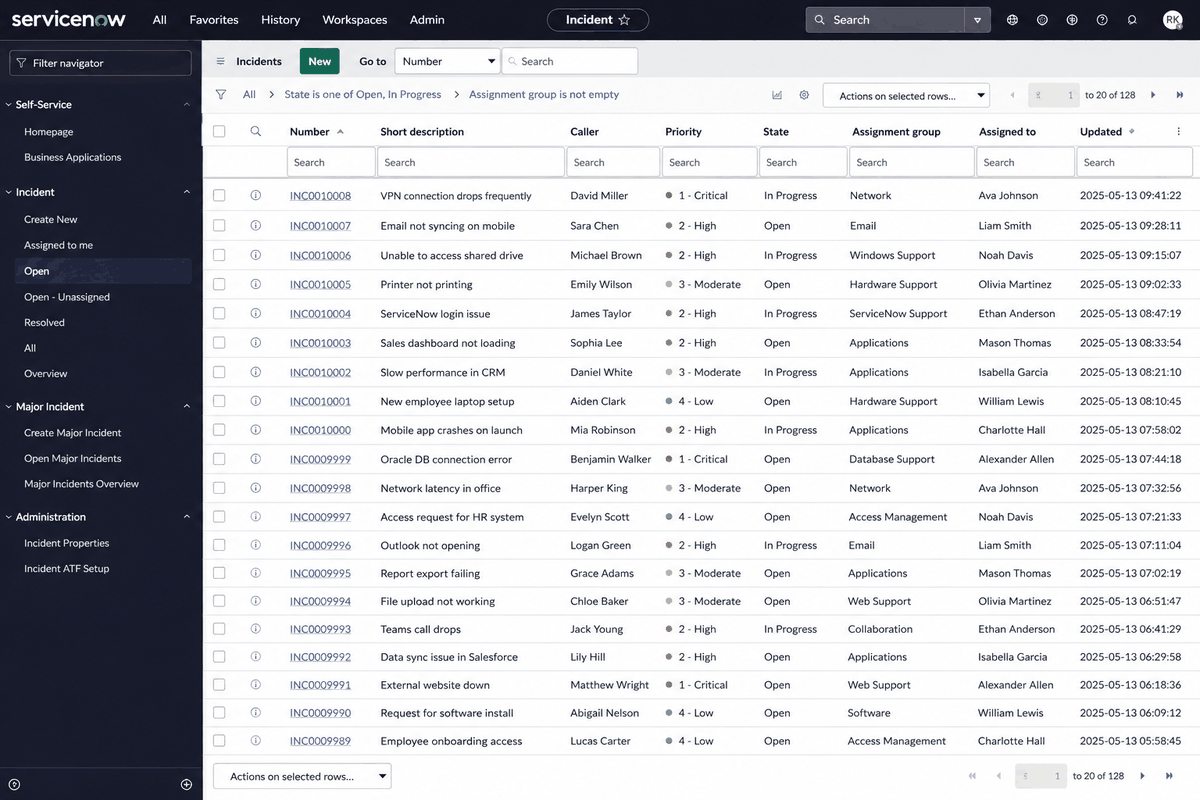
That habit runs on a column of its own. Ticket age is one of the first things you will sort by on a real tool, and on most of them you can add the column yourself, sitting next to the priority so a low-priority ticket from three weeks ago is visible to anybody glancing down the list. Learn where your tool keeps it in your first week.

An illustration of a ServiceNow-style incident queue listing twenty incidents with their number, caller, priority, state and assignment group.
An illustration of a commercial ITSM queue, drawn rather than captured. Read one thing off it and leave the rest: a real queue has an assignment group. It is the field beginners skip and leads look at first, because a ticket parked in the wrong team's queue is work nobody is doing while every clock on it keeps running.

ServiceNow is a trademark of ServiceNow, Inc. ServiceDesk Simulator is not affiliated with, endorsed by, or sponsored by them.

The numbers a team lead actually looks at

First contact resolution
The share of tickets closed on the first interaction, without passing them on. The headline measure of a first line.
Backlog age
How old the oldest untouched tickets are. An average can look healthy while a ticket from three weeks ago sits in the corner, which is why the oldest one is the number a lead reads.
Reopen rate
How often a closed ticket comes back. High reopens mean tickets are being closed to make the queue look tidy, and the fault walks back in a day later.

Those three are why cherry-picking the easy tickets is visible from a mile away. Your close count goes up, the backlog ages, and somebody notices that every hard ticket in the queue has been read by you and left.

One person down, or a whole floor

This is the judgment call worth rehearsing, because it comes up in interviews almost word for word.

Two tickets. One says a single user cannot log in at all. The other says printing is slow for an entire floor. Which do you take?

Headcount against how stopped they are

One user, cannot log in

  • One person, at zero.
  • Sitting at a desk being paid to do nothing, and nothing they do changes that.

A floor, printing slowly

  • Forty people, degraded.
  • Annoyed, and still working.
The floor wins on headcount, which is why it is tempting. Read the faults again before you take it.

The honest answer is that it depends on a fact neither ticket has given you, so say that in the interview and then name the fact you would go and get. If the floor is the warehouse and the courier leaves at three, the floor wins outright. If the one person is out of the office today and does not need the fix until tomorrow morning, they can wait an hour.

One person completely down and a floor working around a fault sit on the same rung, and the deadline breaks the tie. Whichever you start, the move that costs nothing is to acknowledge both, tell the second one what is happening, and then work the first.

Part two

How this works here

Our queue: the priority ladder, the one place color carries meaning, what taking a ticket does to the list, and the categories this company files its work under.

Our queue, and the priority ladder

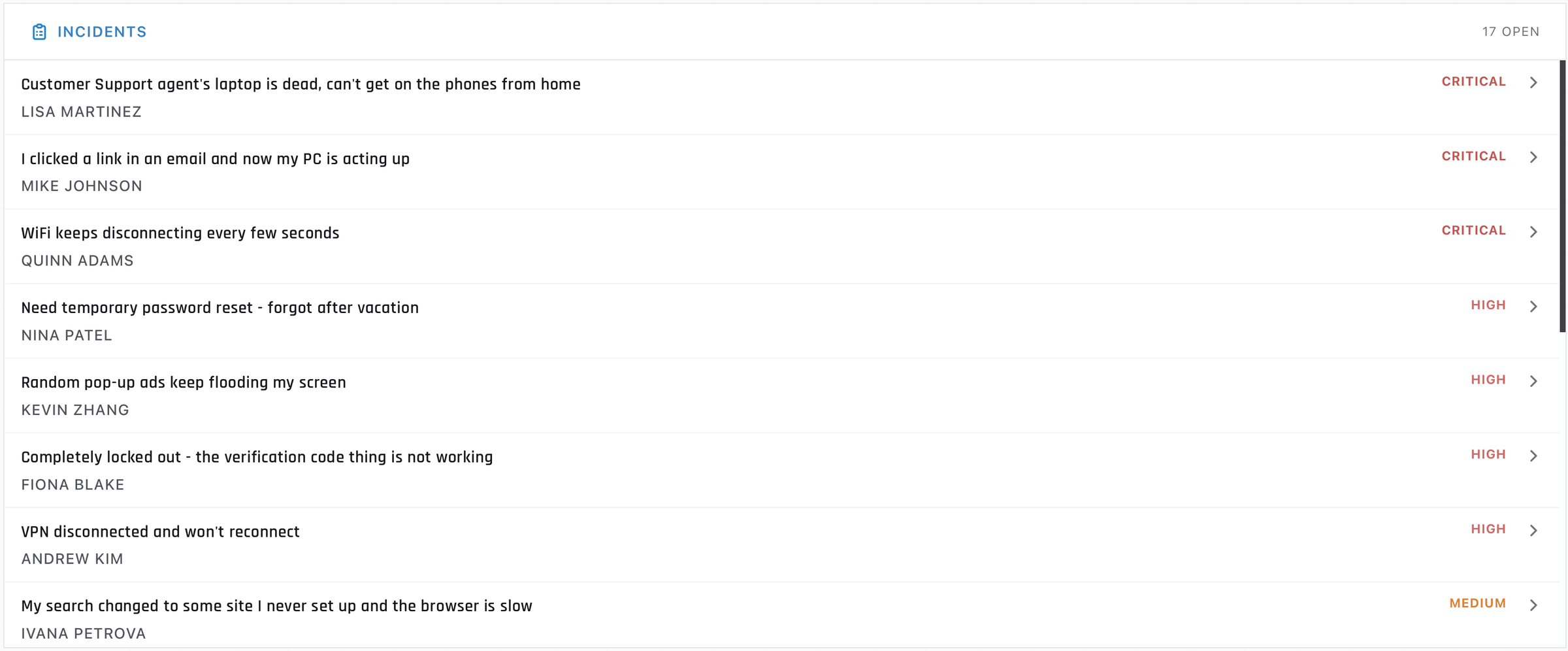
The queue lives on the front page. Under the Ticket Queue heading there is a card called Incidents, and the count on its right reads something like 17 open. Each row gives you the title, the requester underneath it, and the priority on the right.

The Incidents card headed 17 OPEN, listing eight tickets, each showing a title, a requester name underneath and a priority word of Critical, High or Medium on the right
Everything you get before you open something: what they said, who they are, how it was rated.

The ladder is four rungs, and they are the same four words the industry uses: Critical, High, Medium and Low. They are set on the ticket before it reaches you, the way a real tool sets priority from impact and urgency at logging time.

They are also rated the way part one described, so the ladder is worth reading back against those four sentences. Across the hundred tickets this company can produce, 48 are Medium, 32 are High, 17 are Critical and 3 are Low. That mix is weighted toward the interesting work on purpose. A real desk runs the other way up: Lows and Mediums fill the queue, Highs arrive a few times a day, and a Critical is something that happens in some weeks and not others. Here you meet a Critical often enough to practice one.

A ticket this queue can hand youWhy it sits where it sits
Legal name change after marriage - please update my account, rated Low Nobody is stopped and nobody is slowed. It is a request, and it is the same request next Tuesday.
Computer running extremely slow, rated Medium One person, working, and working badly. The rest of their job still functions, which is what holds it at Medium.
Laptop says disk is full - cannot save any files, rated High One person who cannot do the thing their work consists of. It sounds mundane, and it stops somebody completely.
Cannot connect to Floor 2 printer, rated High The other half of the same rung: several people disrupted by one fault, all of them still working around it.
Nobody on the 3rd floor has internet right now, rated Critical Several people, completely down, which is the definition part one gave for the top rung.
Customer Support PC is completely dead, rated Critical One person stopped, which is High, lifted a rung because the agent cannot take customer calls. That is the first rider: a business function at zero.
Got a security alert about a login I did not do, rated Critical One person, still able to work, and Critical anyway. That is the second rider: a suspected compromise goes to the top rung, because the damage keeps growing while the ticket sits.

Priority is the one place in this whole app where color carries meaning, and the choice is deliberate. Critical is red and Low is yellow, with High and Medium in between, so the shape of a queue is readable before you have read a single word of it. Everywhere else the interface is black, white and blue on purpose: if something is colored here, it is telling you something.

The list arrives already sorted, highest priority first, and it stays in that order. Anything already solved but not yet closed sinks to the bottom. So the top row is the highest-rated open ticket, and choosing which one to work is the judgment part three drills.

Taking a ticket, and what My Queue means

Open a ticket from the queue and look under the title. There is an Assignee row, and on an untouched ticket it reads Unassigned next to a button marked Assign to me. That button is what claiming looks like here.

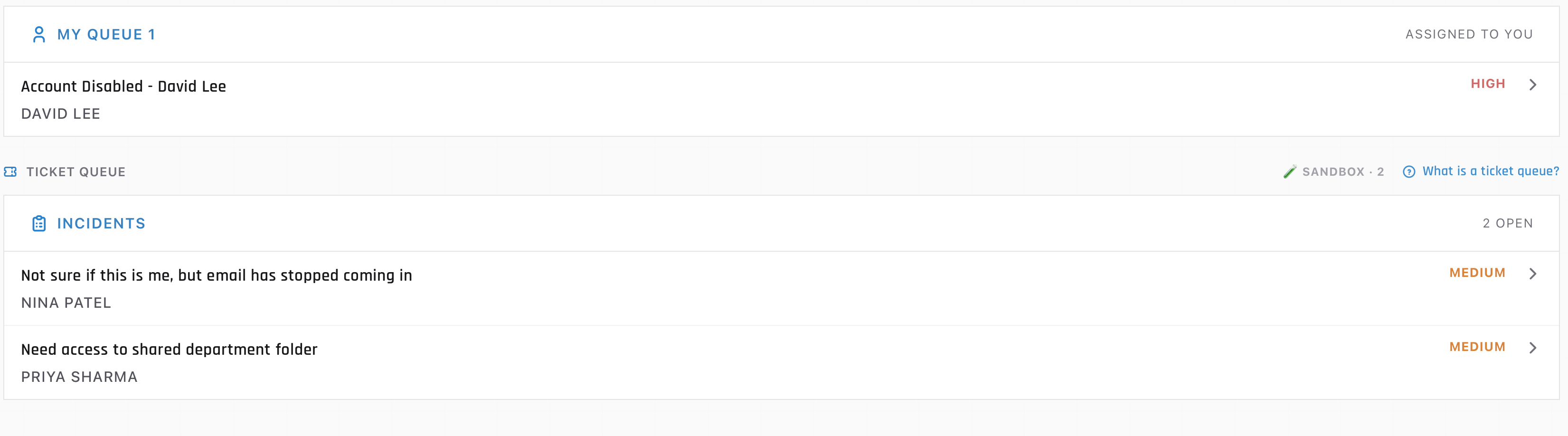
Press it and three things happen at once. The ticket leaves the Incidents list, so nobody is looking at a queue that still advertises work you have taken. A section appears above the queue called My Queue, with a count, marked Assigned to you. And the assignee row now carries your name.

My Queue showing one claimed ticket above the Ticket Queue section, which lists two remaining open incidents
My Queue sits above the open list, with the incidents nobody has claimed underneath it.

The reverse control is Unassign, and the confirmation says exactly what it does: It will go back to the open queue for someone else to pick up. On a real desk that is a normal, healthy move when a ticket turns out to belong to another team, and the sooner you make it the sooner somebody who can progress it sees it.

Two smaller things you will meet in the same screen. Back to Queue, top left, returns you to the list with the ticket still yours. And Close ticket, in the ticket menu, is what finally takes it off the board: closed tickets are readable afterwards under Past Tickets in your profile menu.

What this queue calls things

Left column is what is on the screen in front of you. Right column is what the same thing is called in a tool you will be paid to use.

In this queueOn the job
Incidents The unassigned queue, or the open view
The count beside Incidents Queue depth, the number a lead watches all day
My Queue Assigned to me
Assign to me Claiming, or self-assignment out of the pool
Unassign Returning it to the queue, or reassigning the group
Critical, High, Medium, Low P1 to P4, derived from impact and urgency
Past Tickets Resolved and closed records, which is what reporting runs on

The row a real tool adds to that table is the clock. The SLA clock rides on the ticket, drawn as a countdown next to the priority, turning red as it runs out and leaving a breach marker behind when it does. It is why part one spends as long as it does on the two clocks: a countdown changes how a whole queue reads, and the ticket you pick is often the one whose response clock is nearly gone, wherever it sits on the ladder.

Two more differences, small but worth expecting. The first was flagged back in Your first shift: everything here sits under Incidents, service requests included. And on a free account the queue stops handing out new work once you hit the daily allowance, which is a limit on the account: the card then reads Daily ticket limit reached. Clear the queue legitimately and you get No incidents available. Nice work. instead.

What this company files a ticket under

Every ticket here carries the four fields part one just described, and two of them live on the record behind the screen. The queue row shows you the title, the requester and the priority; the ticket itself adds the description. Category and department are on the record, used by the engine and by your own statistics, and drawn in front of you on the two screens where you are the one filing the ticket: the form beside a live call, and the one a voicemail opens.

The five drawers, and the finer one underneath

The data behind this company files every ticket into one of five categories. Hardware is the largest at 34 of the 100, then Software at 24, Network at 23, Access at 17, and Server at 2. Server is small on purpose: it is reserved for the faults that belong to a shared service, which is why None of the printers in the office are working is a Server ticket and Cannot print to network printer is a Network one. That is the shared-service rule from part one, applied twice: the shared service is what broke in the first ticket, and in the second the printer is up and one person's path to it is broken.

CategoryWhat belongs in it here
Access Anything about who a person is and what they are allowed to open. Passwords, lockouts, second factors, group membership, a new starter's account, a leaver's account being shut off. If the fix happens in the Directory and the machine in front of them is fine, it is Access.
Hardware The physical object and what plugs into it. Power, displays, docking stations, headsets, mice and keyboards, printers as devices, disks that are full, machines that are slow. If you would solve it by touching, swapping or replacing a thing, it is Hardware.
Network Getting from where they are to where the thing is. WiFi, VPN, connectivity from home, mapped drives, a printer reached over the network, a whole floor gone quiet. The tell is that the resource is up and the path to it is broken.
Software A program on their machine and the services it talks to. Mail and calendar, browsers, file sync, licensing, an application that crashes, and the malware category, which lives here because it arrives as something running on a computer.
Server One shared service, down for everybody who uses it. The mail server refusing mail, the print server holding every queue. Two of the hundred, and they are the two that should make you read the rest of the queue before you start.

Under the category sits a subcategory, which is the finer drawer: Password Reset, Display, Power, Malware, Network Drive, Print Server and forty-odd more. The engine sets it for you, and it is worth knowing it is there, because it is what the engine matches against and what a hint reads before it decides what to tell you.

Where you pick a category yourself

A generated ticket arrives already filed. On the call and voicemail forms the list you pick from is a shorter one, worded for somebody typing while a caller is still talking. Pick the drawer the caller's problem obviously belongs in and it scores.

The description, and the department

A generated ticket arrives with its description already written, in the requester's own voice. Read it the way part one described: their words, then what they observed, then what they had already tried. Some arrive thin on purpose, because some people write three lines and some write one. What you write yourself is the description on the call and voicemail forms, where fifty characters is the floor and the four things part one listed are what actually belong in it.

And Department on those forms is the requester's department, taken from the card in front of you or from their record in the Directory. Twelve of them exist in this company, from Accounting to Sales. Read it, type it, move on.

Part three

Practice

Read your own queue, pick the next ticket, say why, and take it.

Open this module in the simulator