
ServiceDesk Simulator

The Support Toolkit · Module 11 of 16

Mail Security

The thing sitting in front of the mailbox. Quarantine, release, and the two mistakes that get somebody phished or get a customer lost.

Most of the mail aimed at your company never reaches a mailbox, and that is the system working. The interesting tickets are the ones where it was wrong.

Part one

On the job

The gateway in front of the mailbox: what it blocks, how a domain proves who it is, and what releasing a message actually commits you to.

The thing in front of the mailbox

Before a message reaches the server that holds a mailbox, it goes through a secure email gateway: a filtering service that inspects everything inbound and decides whether it is allowed to continue. Deliver it, hold it, or throw it away.

Where the gateway sits

Inbound mail
Gateway
Mail server
Mailbox
The gateway is the front door, so it can refuse a message during the SMTP conversation and never accept it at all. Anything it rejects or holds stays out front, on the gateway, and the gateway's own record is the only account of what happened to it.

Out front is also where filtering is cheapest: the company throws away the overwhelming bulk of inbound mail before it costs any storage, and keeps filtering while the mail server is down.

Microsoft Defender for Office 365
The paid add-on that sits on top of what every Microsoft 365 tenant already has. The baseline is Exchange Online Protection: the quarantine, the anti-spam and anti-phishing policies, and the Tenant Allow/Block List for addresses permanently allowed or blocked. Safe links, safe attachments and impersonation protection are the Defender license, so ask which one you are working in before you go looking for a policy.
Proofpoint
A gateway that sits in front of whatever mail platform you run. Common in enterprises, and known for handing users their own quarantine digest so they can release low-risk mail themselves.
Mimecast
Another gateway with the same shape, which also keeps mail flowing when the platform behind it is down.
Google Workspace filtering
Google does it inside the platform itself. The admin console carries the quarantines, the spam and phishing settings, and the address lists.

Whatever the badge says, you are looking for the same three things: the held messages, the permanent block and allow lists, and the policy that decided.

So there are two logs and they answer different questions. The mail server knows what it did with the messages it received. The gateway knows about the ones it never passed on.
Four kinds of bad mail

Users call all of it spam. The gateway sorts it into four kinds and so should you, because the response is different for each.

Spam
Unwanted bulk mail, annoying and harmless. Graded by a spam confidence score, and above a threshold it goes to junk or to quarantine. Nobody needs to be woken up about it.
Phishing
Mail designed to make someone hand over a password or approve a sign-in, usually by way of a link to a convincing fake login page. The payload is the link itself, and a password typed into that page is an account somebody else now has.
Malware
Mail carrying something executable, in an attachment or behind a link. Gateways detonate suspicious attachments in a sandbox and watch what they do before deciding.
Impersonation
Mail carrying nothing but words, written to look like it came from a person or a supplier you trust, asking for a payment or a gift card or a change of bank details. Also called business email compromise.

What the filter catches, and what a person catches

The filter catches

  • A link to a convincing fake login page.
  • An executable attachment, detonated in a sandbox first.
  • Bulk mail, scored and held above a threshold.

Only a person catches

  • A plain, polite message with no link and no attachment.
  • A name the recipient recognizes, asking for a payment or a change of bank details.
  • A tone that is subtly wrong for the person it claims to be from.
Impersonation is the expensive one. Nothing in it is technically malicious, which is exactly why it gets through, so it is caught by a person noticing that the finance director does not normally ask for that.

SPF, DKIM and DMARC

Anyone can write any address in the From: line of an email and the protocol will carry it. Three records are the industry's answer: Sender Policy Framework (SPF), DomainKeys Identified Mail (DKIM) and Domain-based Message Authentication, Reporting and Conformance (DMARC). All three are published in DNS by the domain that owns the address.

Three questions, asked in that order

SPF Did this come from a server the domain says may send for it? A list of permitted senders, published by the domain, checked against the IP the message arrived from. It checks the machine and only the machine, so an ordinary forward fails SPF as a matter of course: the message arrives from the forwarder's server, which was never on the domain's list.
DKIM Did the domain really sign this, and is it unaltered? A signature the sending server adds, checked against a public key the domain publishes. It proves authorship and integrity, and it survives a forward, because the signature travels with the message. What breaks it is a forwarder that edits on the way through: a mailing list that tags the subject line or appends a footer invalidates the signature every time, which is a large part of why mailing lists are so much trouble to authenticate.
DMARC Does any of that line up with the address a human sees, and what happens when it fails? It requires that SPF or DKIM passed for the same domain as the From: address, which is called alignment. Then p=none delivers anyway and reports the failure to the address in the domain's rua tag. p=quarantine junks it, p=reject refuses it outright.
SPF is who is allowed to send. DKIM is proof nothing was changed. DMARC is what to do when the first two fail. Those three sentences are what an interviewer is listening for.

What this means on a ticket: when a supplier's mail is suddenly being junked and nothing changed on your side, the answer is often that the supplier changed theirs, or that a mailing list or an auto-forward broke alignment. The fix belongs to the sender, so tell them which check failed.

Quarantine, and the two mistakes

Quarantine is the gateway's holding pen: messages it judged bad enough to stop but not certain enough to destroy. They sit there for a fixed retention period and are then deleted. Admins can look through them, and release sends the message on to the mailbox it was addressed to.

Releasing is one click, and there are exactly two ways to get it wrong.

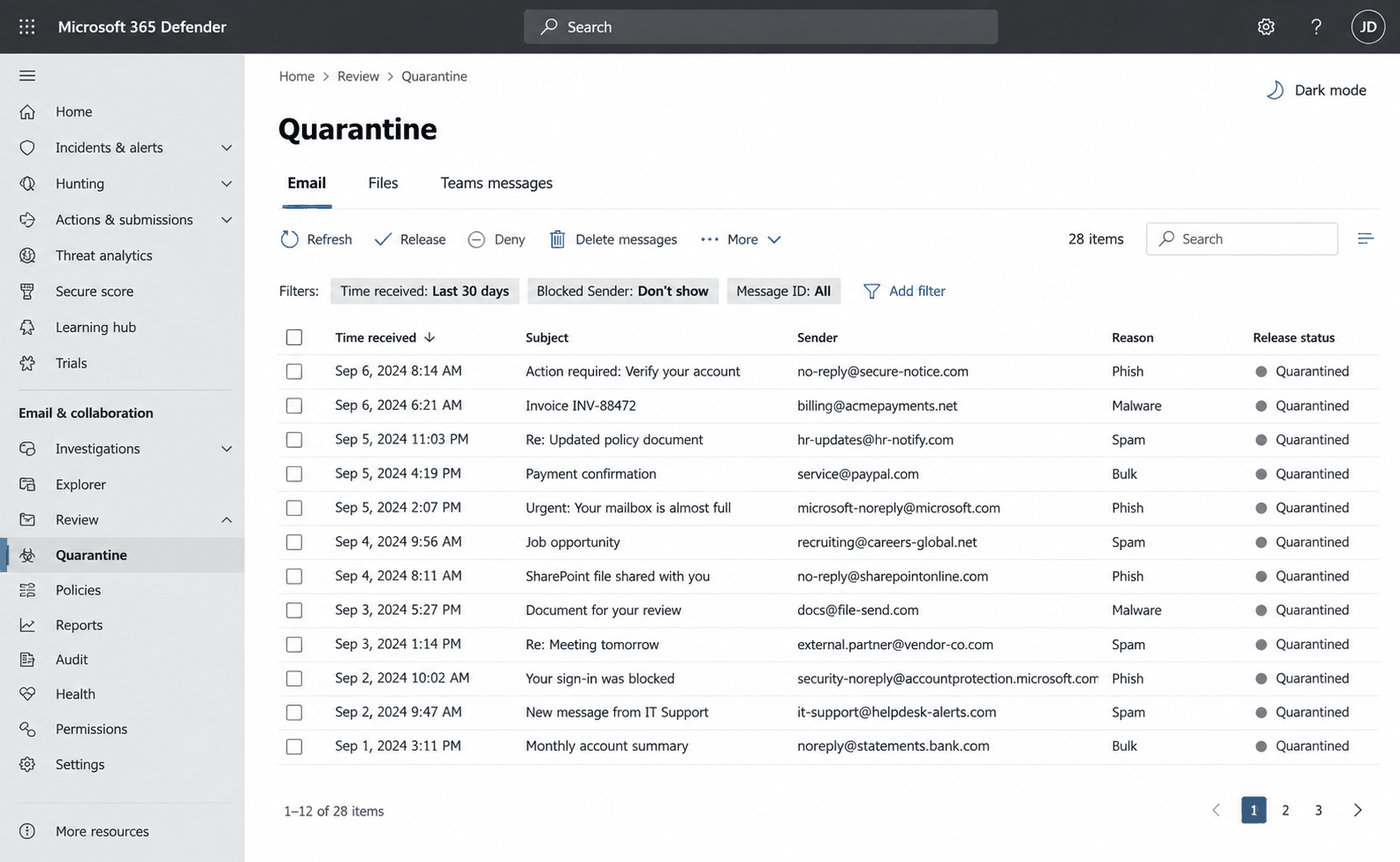
An illustration of a mail security console showing a quarantine page: a list of held messages with the time received, subject, sender, a reason column reading Phish, Malware, Spam or Bulk, and a release status of Quarantined on every row, above a toolbar offering Refresh, Release, Deny and Delete messages.
An illustration of the console a real gateway gives you. Twenty-eight held messages, one reason word each, every row looking exactly like the last. Read the sender and the reason before the subject, because the subject is the part written to persuade you.

Microsoft 365 and Microsoft Defender are trademarks of Microsoft Corporation. ServiceDesk Simulator is not affiliated with, endorsed by, or sponsored by them.

Two ways to get it wrong

You release what was rightly held

  • A user says they are expecting an invoice and asks you to let it through.
  • It is the phishing attempt it was flagged as.
  • The filter was right and you overruled it, and the company has a compromised account.

You leave what was wrongly held

  • A genuine customer is in quarantine, nobody is sure, the ticket gets parked.
  • Nothing in the system flags a held message, so nobody comes back to it.
  • Three days later the customer has taken their business somewhere else.
Both come from the same habit, which is deciding from the ticket. Read the sender, the subject and the reason it was held, and decide on those.

Release what you can justify in one sentence. Everything else stays held, and the ticket carries the reason.

False positives, and your best sensor

A false positive is legitimate mail the filter stopped. They come with the job: the filter is making a judgment on incomplete information millions of times a day.

The four things a filter can do

DeliveredHeld
Legitimate mail CorrectFalse positive
Bad mail The one that got throughCorrect
The two error corners trade against each other. Loosen the filter to keep legitimate mail out of the quarantine and more of the bad mail arrives; tighten it and the quarantine fills with mail somebody was waiting for.
What you are looking atWhat it usually means
Internal colleagues in quarantine Two different causes look identical here. It can be a false positive, your own domain scoring like a stranger because of a misconfiguration. It can equally be a forged From: line or a hijacked mailbox. Read the real sender address before you decide which one you are looking at.
One outside sender failing while everyone else delivers A block on that specific address, often one a previous clean-up left behind and nobody wrote down.
A whole category disappearing at once A policy change somebody made that morning.

The other thing that catches impersonation is a user reporting it. Somebody forwarding you a message asking "is this real?" has noticed that the tone is wrong, which is the part the filter is worst at. A message made of words alone gives a scanner nothing to test, so that report is often the only signal there is.

So the way you answer a report decides whether you get the next one. Thank them and tell them what it turned out to be, even when it was ordinary mail.

Part two

How this works here

The filtering console in this product, what each list holds, and the line where this console stops and the mail console starts.

The filtering console here

In this company, inbound mail is filtered in the cloud before it routes to the on-premises mail server, EXCH01. That filtering service has its own console at Tools, under Email, as Mail Security, alongside the mail console itself, Mail Admin.

Type a mailbox and press Review. You get two lists, one above the other.

Quarantine
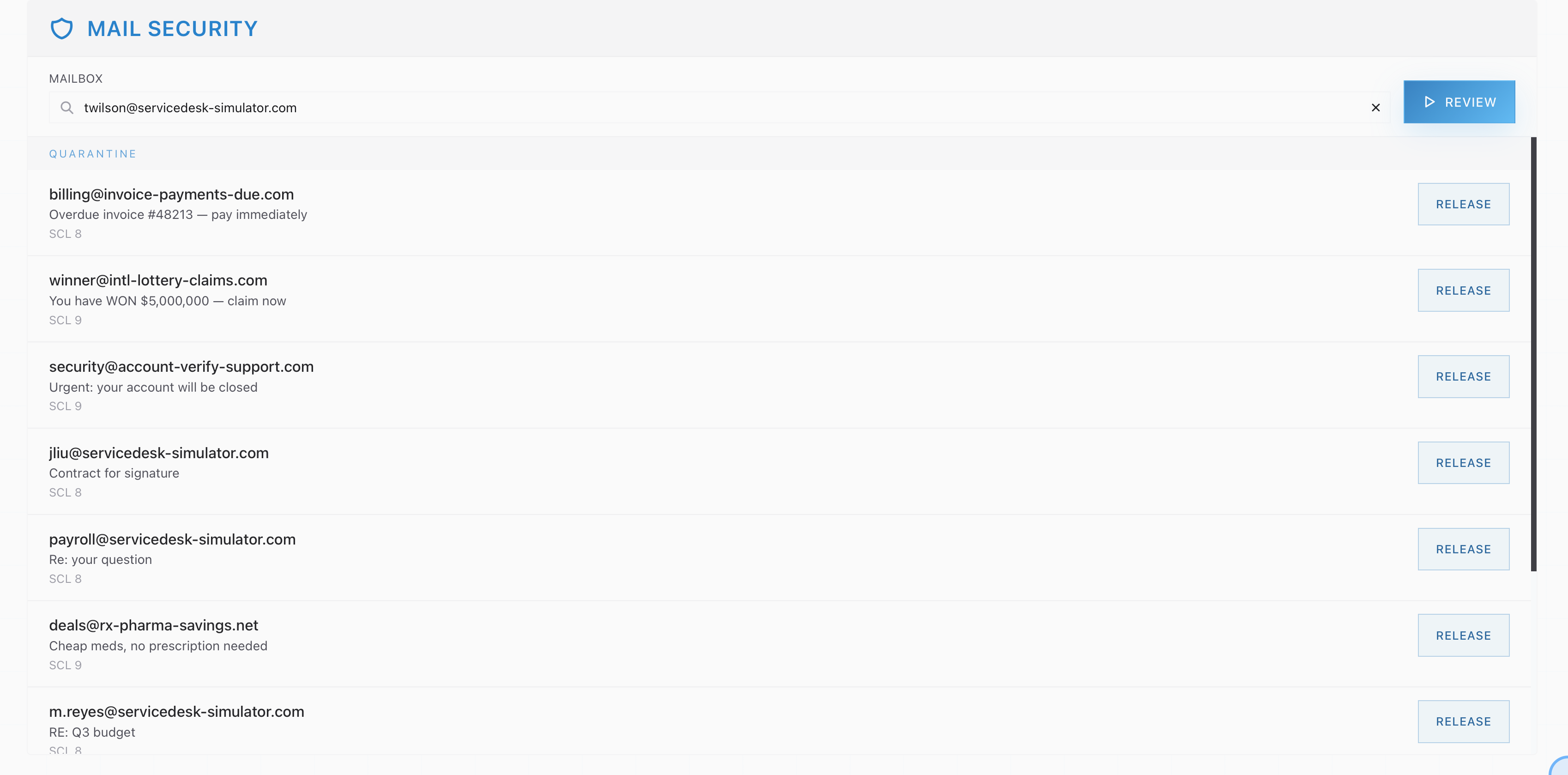
Messages the filter is holding for that mailbox. Each row shows the sender, the subject and the spam confidence level (SCL) it scored, such as SCL 8 or SCL 9. Release sends one on to the mailbox, and the row then offers Undo.
Blocked senders
Addresses and domains that are blocked outright for the whole company, each with the reason it was blocked. Remove takes an entry off the list so that sender can reach people again.

Every row looks the same, the way a real console presents them. You decide from the sender address, the subject line and the reason it was held.

The Mail Security console after reviewing a mailbox, showing a quarantine list where obvious spam from outside domains sits alongside three messages from colleagues on the company domain
Everything here is mail that never reached the mailbox. Read the senders before you read the subjects: the lottery win and the cheap medicine are easy, and the three from colleagues are the ones the job is actually about.

What our verdicts are called in the real world

The reason on a blocked sender is the policy label, the same way a real gateway records why an entry exists.

This consoleWhat it stands in for
Mail Security A secure email gateway: Microsoft Defender for Office 365, Proofpoint, Mimecast, or Google Workspace filtering.
Quarantine The quarantine in any of those products. Mail held for a retention period, then dropped.
SCL 8 or SCL 9 on a held message The spam confidence level, the real Exchange score. Higher means the filter was more certain.
Blocked senders The Tenant Allow/Block List in Defender, or the blocked-senders list in any gateway. Tenant-wide: one list for the whole company.
Phishing A message or sender flagged as credential theft. Highest-confidence block category.
Malware A sender flagged for carrying something executable. Caught by attachment scanning and sandboxing.
Bulk / spam Unwanted bulk mail. The low-risk category, and the one most likely to contain a false positive.
Manually blocked An entry a person typed in. The reason is that person's judgment, which is exactly what an old clean-up leaves behind.
Release Release from quarantine: deliver this held message to the mailbox it was addressed to.
Remove Taking an entry off the block list so that sender can deliver again.

A commercial filter puts more in front of you, and every addition changes what a release decision gets made from. Every quarantined row names the policy that caught it, so you can see which rule fired and whether that rule is the one misbehaving. A release can be made for everybody at once, which is what you actually want when one legitimate newsletter landed in ninety mailboxes, and a false negative can be reported back to the vendor so the verdict improves for the next customer. Users get their own quarantine digest, a scheduled mail listing what was held for them, with a release control on each line, and a large share of these tickets never reaches the desk because of it. And each row shows its SPF, DKIM and DMARC results, so "the sender says they sent it" is answerable from the record.

One more sits in the mail client itself: the report-a-phish button, which is how a user-reported phish reaches security at a company that has one. One press and the message goes to the security team with its full headers attached. At most small companies the report arrives as a ticket instead, in words, which is the version you practice here and the harder one to work.

Where the boundary sits

If the message never reached the mailbox, this console owns the answer.

The filter runs in front of EXCH01, so a message it held was never delivered and was never in a folder. You can read the verdict in Mail Admin, on the Message Trace tab, where the row will say Quarantined with its SCL score, or Failed with 550 5.7.1 Message rejected by policy for a blocked sender. Reading is where the trace stops. Acting on the verdict happens here.

What the trace saidWhich console finishes the job
Quarantined, SCL 8, and the senders are internal colleagues Mail Security, Quarantine. Confirm there whether the filter got it wrong: a message that looks internal is also what a spoof looks like.
Failed, 550 5.7.1 rejected by policy, one sender only Mail Security, Blocked senders. Someone blocked that address.
Anything else: Delivered, or a 5.2.x mailbox code Mail Admin. The message got as far as the mailbox, so the answer is on that side of the line.

The word Quarantined on a trace row sends you to this console. The message stopped at the gateway and is still sitting there, so the release decision gets made here.

Part three

Practice

Read a real quarantine, decide what gets released, and say why for each one you leave.

Open this module in the simulator